
AbortController in JavaScript: Cancel Fetch Requests
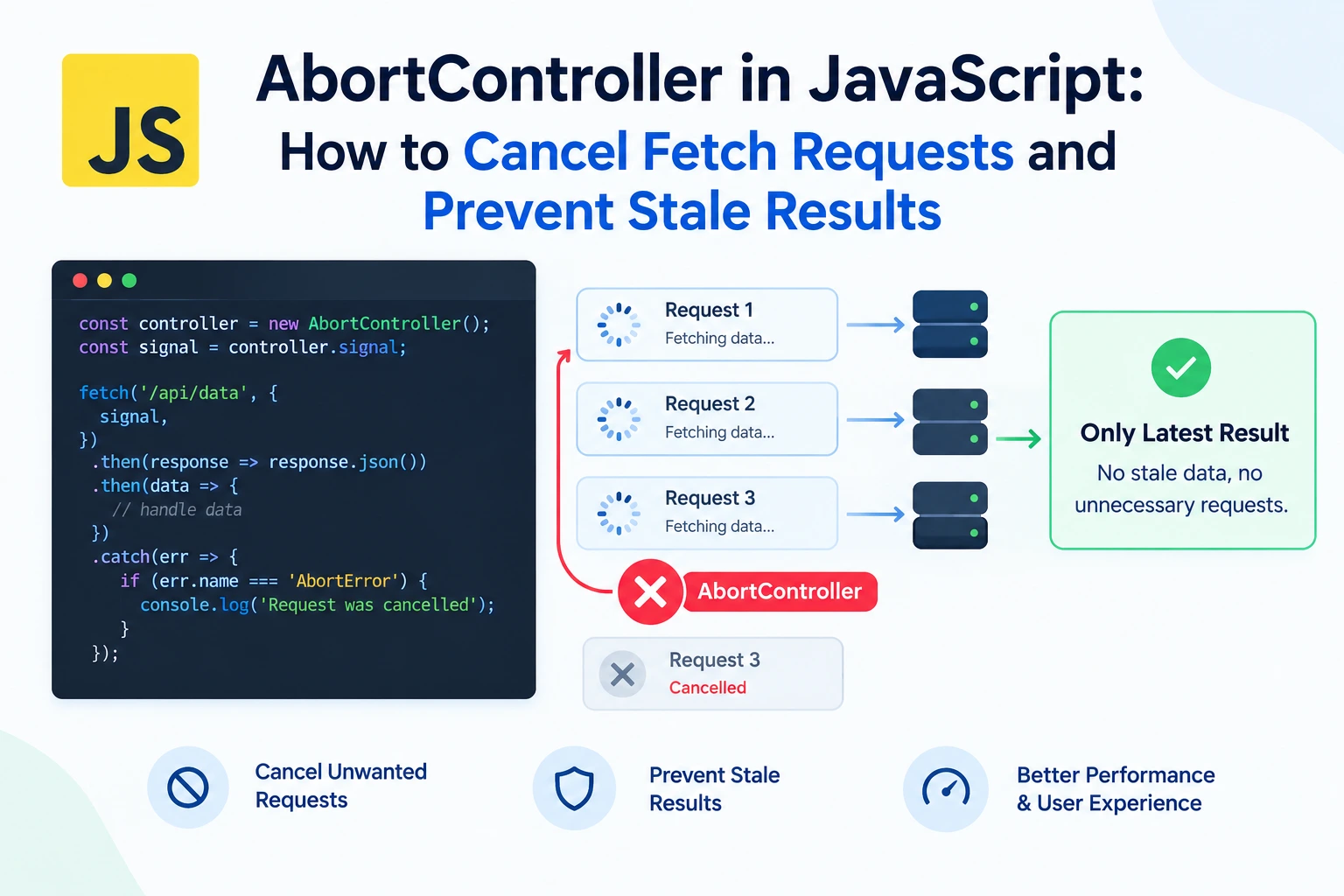
A user searches for “JavaScript,” then quickly changes the query to “Java.”
Your application sends two requests. The second finishes first and displays the correct results. A moment later, the first request finishes and replaces them with outdated results.
Nothing failed at the network level. Both requests succeeded.
The problem is that your application accepted a response it no longer needed.
AbortController helps you cancel supported asynchronous operations when they become unnecessary. Combined with a simple response-validation strategy, it can make search interfaces, page navigation, and other request-heavy features more reliable.
This guide explains how cancellation works, how to use it with fetch(), and where cancellation alone is not enough.
What Is AbortController?
AbortController is a browser API for signaling that an operation should stop.
It has two main parts:
- The controller, which initiates cancellation.
- The signal, which an operation receives and observes.
A basic example looks like this:
const controller = new AbortController();

fetch("/api/products", {
  signal: controller.signal
});

// Cancel the operation when it is no longer needed.
controller.abort();
Calling abort() marks the signal as aborted.
An API that supports the signal can then stop its work or reject its pending operation.
Passing a signal is essential. Creating a controller does not automatically connect it to every request in your application.
Why Request Cancellation Matters
Cancellation is useful whenever work can outlive the reason it started.
Common examples include:
- A search query changes.
- A user leaves a page.
- A component is removed.
- A newer refresh replaces an earlier refresh.
- A request exceeds an acceptable waiting period.
- A group of related operations is no longer needed.
Canceling obsolete work can reduce unnecessary browser-side processing and help prevent outdated interface updates.
However, cancellation is not a guarantee that a server stops processing a request. The server may already have received it and started working.
That distinction becomes especially important for operations that modify data.
Your First Cancelable Fetch Request
Start by creating a controller and passing its signal to fetch().
async function loadProducts(signal) {
  const response = await fetch("/api/products", {
    signal
  });

  if (!response.ok) {
    throw new Error(
      `Request failed with status ${response.status}`
    );
  }

  return response.json();
}

const controller = new AbortController();

loadProducts(controller.signal)
  .then((products) => {
    console.log(products);
  })
  .catch((error) => {
    if (controller.signal.aborted) {
      console.log("Product request canceled");
      return;
    }

    console.error("Could not load products:", error);
  });

// Call this when the result is no longer needed:
// controller.abort();
Two details matter here.
First, fetch() does not reject merely because the server returns an HTTP error such as 404 or 500. Check response.ok yourself.
Second, intentional cancellation should usually be handled differently from an unexpected failure. A canceled search request does not need to produce a frightening error message.
In this example, checking the signal lets the application treat cancellation as an expected outcome.
An AbortSignal Cannot Be Reset
Once a signal has been aborted, it remains aborted.
This does not create a fresh request lifecycle:
const controller = new AbortController();

controller.abort();

fetch("/api/products", {
  signal: controller.signal
});
The request receives an already-aborted signal and rejects rather than proceeding normally.
Create a new controller for each independently cancelable operation.
function startProductRequest() {
  const controller = new AbortController();

  return {
    controller,
    promise: loadProducts(controller.signal)
  };
}
You can share a signal intentionally, but you cannot reuse an aborted signal as if it were new.
Preventing Stale Search Results
A reliable search interface needs to answer two questions:
- Can the previous request be canceled?
- Is this result still relevant when it arrives?
Cancellation helps with the first question. A version check answers the second.
Here is a complete pattern using an input field and a results container:
const input = document.querySelector("#search");
const results = document.querySelector("#results");

let activeController = null;
let inputVersion = 0;
let debounceTimer;

input.addEventListener("input", () => {
  const query = input.value.trim();
  const version = ++inputVersion;

  clearTimeout(debounceTimer);
  activeController?.abort();
  activeController = null;

  results.textContent = "";

  if (!query) {
    return;
  }

  debounceTimer = setTimeout(() => {
    search(query, version);
  }, 300);
});

async function search(query, version) {
  const controller = new AbortController();
  activeController = controller;

  results.textContent = "Loading...";

  try {
    const response = await fetch(
      `/api/search?q=${encodeURIComponent(query)}`,
      { signal: controller.signal }
    );

    if (!response.ok) {
      throw new Error(
        `Search failed with status ${response.status}`
      );
    }

    // Expected response: { items: [{ title: "..." }] }
    const data = await response.json();

    if (
      controller.signal.aborted ||
      version !== inputVersion
    ) {
      return;
    }

    results.textContent = data.items
      .map((item) => item.title)
      .join("\n");
  } catch (error) {
    if (
      controller.signal.aborted ||
      version !== inputVersion
    ) {
      return;
    }

    results.textContent =
      "Search could not be completed. Please try again.";

    console.error(error);
  } finally {
    if (activeController === controller) {
      activeController = null;
    }
  }
}
Why This Uses Both Cancellation and a Version Check
Each input change immediately:
- Invalidates previous results.
- Cancels the active request.
- Clears the previous debounce timer.
- Schedules work for the latest query.
The version check prevents an obsolete operation from updating the interface, even if cancellation arrives too late or later processing does not respond to the signal.
The important principle is:
A result should update the interface only if it still belongs to the current user intent.
Debouncing reduces how often requests begin. Cancellation stops supported obsolete work. Version checks protect correctness.
These techniques complement one another.
Adding a Request Timeout
Requests should not necessarily remain pending for as long as the network allows.
For a straightforward timeout in supported environments, use AbortSignal.timeout():
async function loadProfile() {
  const signal = AbortSignal.timeout(5000);

  try {
    const response = await fetch("/api/profile", {
      signal
    });

    if (!response.ok) {
      throw new Error(
        `Request failed with status ${response.status}`
      );
    }

    return await response.json();
  } catch (error) {
    if (signal.aborted) {
      console.error("The request timed out.");
    }

    throw error;
  }
}
Check support in your target browsers and runtime before relying on this API.
Also, treat the timeout as an application waiting limit—not a promise that the server has stopped working.
A Timer-Based Alternative
You can also create a timeout using a controller and setTimeout():
async function fetchJsonWithTimeout(
  url,
  timeoutMs = 5000
) {
  const controller = new AbortController();

  const timerId = setTimeout(() => {
    controller.abort();
  }, timeoutMs);

  try {
    const response = await fetch(url, {
      signal: controller.signal
    });

    if (!response.ok) {
      throw new Error(
        `Request failed with status ${response.status}`
      );
    }

    return await response.json();
  } finally {
    clearTimeout(timerId);
  }
}
This keeps the timeout active through response-body consumption and always clears the timer when the operation settles.
It does not distinguish timeout cancellation from other cancellation reasons because this helper only implements a timeout.
Canceling Multiple Requests Together
A single signal can be passed to several related operations.
const controller = new AbortController();

const requests = [
  fetch("/api/profile", {
    signal: controller.signal
  }),
  fetch("/api/notifications", {
    signal: controller.signal
  }),
  fetch("/api/preferences", {
    signal: controller.signal
  })
];

const outcomesPromise = Promise.allSettled(requests);

// When the whole group is no longer needed:
// controller.abort();

const outcomes = await outcomesPromise;
Calling controller.abort() signals cancellation to all three requests.
This is useful when several requests belong to one screen or workflow.
However, shared cancellation also means shared consequences. If one request should continue independently, give it a separate controller.
Another important detail: Promise.all() does not automatically cancel sibling operations when one rejects. Cancellation must be implemented separately.
Cleaning Up Event Listeners With a Signal
AbortController is not limited to network requests.
Supported event-listener APIs also accept a signal:
const controller = new AbortController();

window.addEventListener(
  "resize",
  () => {
    console.log("Window resized");
  },
  { signal: controller.signal }
);

document.addEventListener(
  "keydown",
  (event) => {
    console.log(event.key);
  },
  { signal: controller.signal }
);

// Removes both listeners.
controller.abort();
This can simplify cleanup when several listeners belong to the same interface.
Use the same controller only when those resources should share a lifecycle.
What AbortController Does Not Do
It Does Not Cancel Every Promise
Promises do not have a universal built-in cancellation mechanism.
An operation must explicitly support AbortSignal or implement its own cooperative cancellation behavior.
Passing a signal to an unrelated function has no effect unless that function reads it.
It Does Not Interrupt Synchronous JavaScript
Aborting a signal does not forcibly stop a long-running loop or expensive synchronous calculation.
For substantial CPU work, consider splitting the work into smaller tasks or moving appropriate processing to a Web Worker.
It Does Not Undo Server-Side Changes
Suppose a payment request reaches the server and the browser then aborts while waiting for the response.
The payment may still complete.
Do not assume:
“The request was canceled, so the transaction did not happen.”
Important writes need server-side safeguards such as idempotency keys, transaction identifiers, and status checks.
It Does Not Replace Error Handling
A request can fail because of:
- Network problems.
- HTTP errors.
- Invalid response data.
- Response-body parsing errors.
- Intentional cancellation.
Your application still needs to distinguish expected outcomes from failures that require attention.
Common Mistakes to Avoid
- Reusing an aborted controller: create a new one for new work.
- Forgetting to pass the signal: the controller otherwise has no connection to the request.
- Showing errors for every canceled search: intentional cancellation is often normal.
- Assuming cancellation guarantees correctness: also validate whether results remain relevant.
- Aborting unrelated requests together: share signals only for shared lifecycles.
- Treating canceled writes as rolled back: verify the server-side outcome.
- Forgetting cleanup: clear timers and cancel obsolete work when an interface is removed.
Frequently Asked Questions
Does aborting fetch reject its promise?
A pending fetch generally rejects when aborted. If the fetch has already resolved with a response, aborting can still affect pending response-body consumption. It does not reverse work that has already completed.
Should I cancel the previous request before starting a new one?
For “latest result wins” interfaces such as search suggestions, that is often useful. Independent requests should not automatically cancel one another.
Is AbortController a replacement for debounce?
No. Debounce controls when work starts. AbortController signals that supported work should stop.
Can I use AbortController in React?
Yes. A common pattern is to create a controller inside an effect, pass its signal to the request, and abort during cleanup. Handle cancellation explicitly and ensure obsolete work cannot update current state.
Final Thoughts
AbortController gives JavaScript applications a practical way to stop work that is no longer needed.
Use it to cancel obsolete requests, apply waiting limits, and clean up resources that share a lifecycle.
But remember its boundaries:
Cancellation is a signal—not a rollback, not a universal promise feature, and not a substitute for checking whether a result still belongs on the screen.
Reliable interfaces combine cancellation with clear ownership, careful error handling, and protection against stale updates.
Try Next
Other utilities you might find helpful
Regex Tester
Test and debug regular expressions with live matches.
Regex Debugger
Understand regex step-by-step with explanations.
JSON Formatter
Format, validate, and minify JSON instantly.
Base64 Encoder/Decoder
Encode and decode Base64 strings and files.
SQL Explain Parser
Analyze SQL execution plans and optimize queries.
DOM Complexity Analyzer
Analyze HTML DOM structure, detect deep nesting, count nodes, and identify performance issues instantly.