
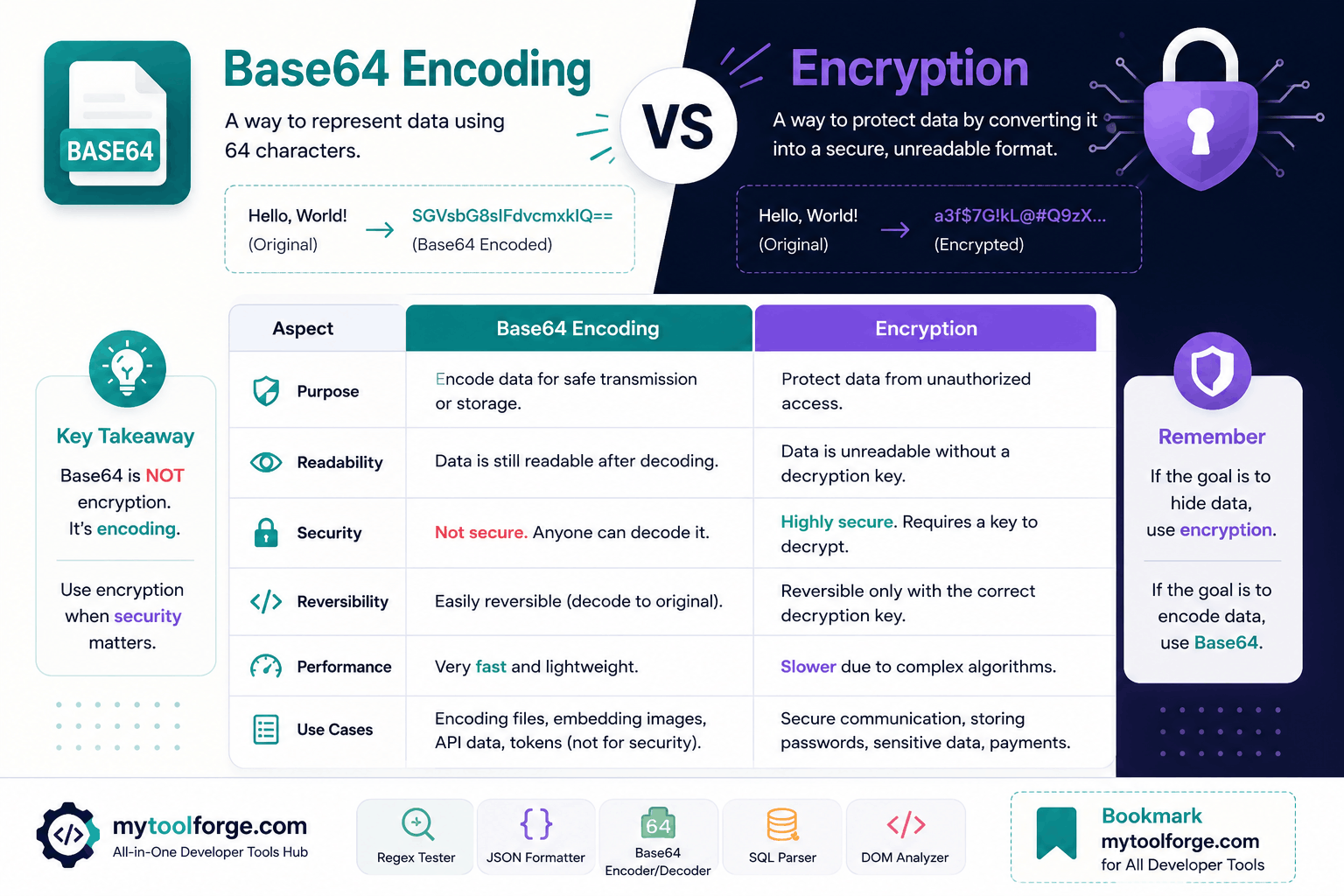
Base64 Encoding vs Encryption: Key Differences Developers Must Know
Base64 output can look scrambled:
dXNlcm5hbWU6cGFzc3dvcmQ=But it is not encrypted.
Anyone who receives that value can decode it without a password or secret key:
username:passwordThis distinction matters because encoding and encryption solve completely different problems.
- Base64 encoding represents bytes as text.
- Encryption protects data from unauthorized disclosure.
- Hashing creates a one-way digest.
- Password hashing protects stored passwords.
- Message authentication detects unauthorized modification.
- Digital signatures verify integrity and the signer’s private-key possession.
Using Base64 where encryption or password hashing is required can expose credentials, personal information, access tokens, and other sensitive data.
Quick Comparison
| Technique | Reversible? | Requires a secret? | Primary purpose |
|---|---|---|---|
| Base64 | Yes | No | Represent binary data as text |
| Encryption | Yes, with the key | Yes | Confidentiality |
| Cryptographic hash | No | No | Digest or fingerprint |
| Password hashing | Verification only | No decryption key | Password storage |
| HMAC | No | Yes | Integrity and authenticity |
| Digital signature | Verified with public key | Private key signs | Integrity and authenticity |
These techniques may appear together in one system, but they are not interchangeable.
What Is Base64 Encoding?
Base64 is a binary-to-text encoding format.
It converts bytes into characters selected from this alphabet:
ABCDEFGHIJKLMNOPQRSTUVWXYZabcdefghijklmnopqrstuvwxyz0123456789+/The = character may appear at the end as padding.
Example:
Original text: Hello
Base64:       SGVsbG8=
No secret is required to produce or reverse the transformation.
Standard Base64 is defined in RFC 4648.
What Problem Does Base64 Solve?
Some formats and protocols are designed around text and cannot directly represent arbitrary binary bytes.
Base64 provides a textual representation for data such as:
- Email attachments
- Cryptographic values
- Small binary fields in JSON
- PEM certificates
- Data URLs
- API fields that explicitly require encoded bytes
Its purpose is compatibility—not secrecy.
Base64 Increases Data Size
Base64 transforms every three bytes of input into four output characters.
The encoded length is approximately:
4 × ceil(input bytes ÷ 3)For larger inputs, the size increase approaches roughly 33%.
That overhead matters for:
- Large API payloads
- Mobile connections
- Database storage
- Browser memory
- Log volume
- File uploads
Do not automatically convert every uploaded file to Base64. When supported, binary request bodies, multipart/form-data, or direct object-storage uploads are usually more efficient.
Standard Base64 vs Base64url
Standard Base64 uses:
+ /Base64url replaces those characters with:
- _Padding may also be omitted when the surrounding specification permits it.
The variants are related but should not be treated as identical. RFC 4648 defines Base64url separately for URL- and filename-safe contexts.
Base64url is commonly encountered in JSON Web Tokens.
What Is Encryption?
Encryption transforms plaintext into ciphertext using an encryption algorithm and key.
Conceptually:
plaintext + key + encryption parameters
    ↓
ciphertext
Decryption uses the correct key and parameters:
ciphertext + key + encryption parameters
    ↓
plaintext
Unlike Base64, properly implemented encryption is designed to prevent unauthorized parties from reading the original information.
However, encryption is not secure merely because an algorithm has been added. Security also depends on:
- Algorithm and mode
- Key strength
- Key generation
- Nonce or initialization-vector handling
- Authentication
- Key storage
- Access control
- Key rotation
- Error handling
- Library implementation
- Threat model
Do not design a custom encryption format unless you have the required cryptographic expertise and review.
Symmetric Encryption
Symmetric encryption uses the same secret key for encryption and decryption.
Conceptually:
Encrypt(data, secretKey)
Decrypt(ciphertext, secretKey)
Symmetric encryption is suitable for protecting larger amounts of data.
Modern applications should generally use an authenticated-encryption construction, such as:
- AES-GCM
- ChaCha20-Poly1305
Authenticated encryption provides:
- Confidentiality
- Integrity checking
- Detection of modified ciphertext
OWASP recommends authenticated cipher modes where available and emphasizes proper key management.
Why authentication matters
Encryption without authentication may hide the plaintext while still allowing an attacker to modify the ciphertext in dangerous ways.
The application should reject data when authentication fails. It should not attempt to process partially decrypted or modified content.
Asymmetric Encryption
Asymmetric cryptography uses a key pair:
- Public key
- Private key
Data encrypted for a recipient can be protected using public-key techniques so that the recipient’s private key is required for decryption.
Public-key cryptography is also used for digital signatures, but encryption and signing are different operations.
In practice, systems rarely use RSA or another asymmetric algorithm to encrypt a large file directly. They generally use hybrid encryption:
- Generate a random symmetric data key.
- Encrypt the data with authenticated symmetric encryption.
- Protect the data key using a public-key or key-management mechanism.
- Store or transmit the protected key with the ciphertext.
Use established protocols and maintained libraries instead of constructing this workflow manually.
Base64 After Encryption
Encrypted bytes are still binary. If they must be placed in JSON, a URL-safe field, or another text format, they may be Base64-encoded afterward.
A conceptual flow is:
Plaintext
   ↓ encrypt
Nonce + ciphertext + authentication tag
   ↓ Base64 encode
Text representation for transport
The receiver reverses the representation first:
Base64 text
   ↓ Base64 decode
Nonce + ciphertext + authentication tag
   ↓ decrypt and authenticate
Plaintext
Base64 adds no security to this process. The encryption remains responsible for confidentiality and integrity.
The format must also define:
- Version
- Algorithm identifier
- Nonce
- Ciphertext
- Authentication tag
- Optional key identifier
Do not assume that concatenating values without a documented format will remain interoperable.
Encoding Is Not Security
This Base64 value:
cGFzc3dvcmQxMjM=decodes to:
password123Changing the representation does not protect the information.
The same principle applies to:
- Hexadecimal
- URL encoding
- ROT13
- Character substitution
- Reversing a string
- Compression
- Serialization
- Obfuscation
If the recipient can recover the original value without possessing a secret, the operation does not provide cryptographic confidentiality.
HTTP Basic Authentication
HTTP Basic Authentication creates a value from:
username:passwordand encodes it with Base64:
Authorization: Basic dXNlcm5hbWU6cGFzc3dvcmQ=Base64 does not protect the credentials.
Anyone who obtains the header can decode it. Basic Authentication therefore depends on TLS and must be used only through properly configured HTTPS.
RFC 7617 defines the Basic Authentication scheme and discusses its security considerations.
Additional precautions include:
- Never place Basic credentials in a URL.
- Do not log authorization headers.
- Avoid sending credentials to untrusted origins.
- Use short-lived, scoped credentials where possible.
- Apply rate limiting.
- Protect credentials at rest.
- Rotate compromised credentials.
HTTPS protects the connection in transit. It does not prevent the destination server, browser extensions, application logs, or compromised clients from seeing the credentials.
HTTPS and Base64 Solve Different Problems
Suppose an API sends this JSON:
{
  "secret": "cGFzc3dvcmQxMjM="
}
Base64 only changes the representation.
HTTPS protects the HTTP connection between the client and server against network interception and modification when TLS is correctly configured.
A typical flow is:
Application data
   ↓ serialized as JSON
HTTPS/TLS-protected connection
   ↓
Destination server
After the data reaches the destination, TLS no longer determines how it is:
- Logged
- Stored
- Backed up
- Displayed
- Shared internally
- Authorized
- Deleted
Transport encryption is necessary, but sensitive data may require additional controls at rest and within the application.
JSON Web Tokens Are Not Automatically Encrypted
A typical signed JWT contains three Base64url-encoded sections:
header.payload.signatureThe header and payload can normally be decoded by anyone who obtains the token.
Signing can help the recipient detect unauthorized modification, but it does not hide the payload.
Do not place secrets in a signed JWT payload merely because the token looks unreadable.
JWT-related distinctions include:
- JWS: Signed or integrity-protected data
- JWE: Encrypted data
- Base64url: Text representation used by these formats
RFC 7519 defines JWTs and their use of Base64url-encoded values.
Even an encrypted token must still be protected from theft if possession grants access.
Bearer Tokens Must Be Protected
An access token may be:
- Opaque
- Base64-encoded
- Base64url-encoded
- JWT-shaped
- Random text
Its visual format does not determine its security.
If possession of the token grants access, treat it like a credential:
- Transmit it only over HTTPS.
- Never expose it in public URLs.
- Avoid logging it.
- Apply short lifetimes where appropriate.
- Limit its permissions.
- Protect browser storage.
- Rotate or revoke it when required.
- Prevent accidental disclosure to third parties.
Encrypting or encoding a bearer token does not eliminate the risk of token theft.
Passwords Should Be Hashed, Not Encrypted
Passwords are a special case.
An application normally needs to verify a password, not recover the original plaintext. Passwords should therefore be protected using a dedicated password-hashing function.
Recommended choices depend on the platform and current security guidance, but commonly include:
- Argon2id
- scrypt
- bcrypt for suitable legacy or constrained environments
- PBKDF2 when required by platform or compliance constraints
OWASP recommends strong, slow password-hashing algorithms and advises against storing plaintext passwords.
Password-storage workflow
Registration:
Password
   ↓ password-hashing function with salt and work parameters
Stored password hash
Login:
Submitted password
   ↓ verify using stored algorithm and parameters
Match or no match
The original password is not decrypted.
Do not store passwords using:
- Base64
- Plain SHA-256
- Plain SHA-1
- MD5
- Reversible encryption
- Custom transformations
Fast general-purpose hashes are designed to process data quickly. Password hashing is intentionally expensive to slow offline guessing attacks.
Use the password API provided by your framework or a vetted library.
Encryption vs Hashing
A cryptographic hash converts input into a fixed-size digest:
input → digestIt is designed to be one-way.
Example use cases include:
- Content fingerprints
- File-integrity comparisons in trusted workflows
- Internal identifiers
- Components of signature and authentication systems
A bare hash does not prove who created the data. If an attacker can change both the file and the stored hash, the hash alone provides no protection.
For message authentication between parties sharing a secret, use a construction such as HMAC rather than inventing:
hash(secret + message)For public verification, use an appropriate digital-signature system.
Encryption Is Not the Same as Hashing
| Question | Encryption | Hashing |
|---|---|---|
| Can the original data be recovered? | Yes, with the key | Not by normal design |
| Primary purpose | Confidentiality | Digest or verification primitive |
| Requires a secret key? | Yes | Not necessarily |
| Appropriate for stored passwords? | No | Only a password-specific hash |
| Can it detect tampering? | Only with authenticated encryption | A bare hash is insufficient against an attacker |
Always define the required security property:
- Confidentiality
- Integrity
- Authenticity
- Password verification
- Non-repudiation
- Transport protection
Then select a suitable established mechanism.
File Upload Example
Suppose an API accepts a profile image.
Base64 approach
{
  "filename": "profile.png",
  "content": "iVBORw0KGgoAAAANSUhEUg..."
}
Base64 allows binary bytes to appear in JSON, but it:
- Increases payload size
- Requires additional memory
- Adds encoding and decoding work
- Does not make the image trustworthy
- Does not encrypt the image
For larger files, prefer:
multipart/form-data- Binary request bodies
- Direct object-storage uploads
- Signed upload URLs
Security validation is still required
After receiving the file:
- Enforce the decoded size limit.
- Inspect the actual file type.
- Do not trust the filename.
- Use a generated storage name.
- Apply authorization.
- Store files outside executable application paths.
- Serve with appropriate headers.
- Apply malware controls where required.
Neither Base64 nor encryption proves that an uploaded file is safe.
Data URLs
A Base64 data URL may look like:
data:image/png;base64,iVBORw0KGgo...It can embed a small resource directly into a document.
Advantages:
- Self-contained resource
- Convenient for generated previews
- Useful in some email templates
- No separate file URL
Disadvantages:
- Larger text representation
- Difficult independent caching
- Larger HTML or CSS documents
- More memory use
- Harder debugging
- Potential content-security concerns
Do not use data URLs as a security feature.
Data at Rest
Whether a database field should be encrypted depends on the threat model and data classification.
Ask:
- What data is sensitive?
- Who needs access?
- What happens if the database is copied?
- Are backups protected?
- Can application administrators view the field?
- Must the application search or sort it?
- Are logs and analytics receiving it?
- What legal or contractual obligations apply?
- How will keys be rotated?
- How will data be recovered after key loss?
Possible controls include:
- Storage or disk encryption
- Database encryption
- Application-level field encryption
- Tokenization
- Access controls
- Data minimization
- Retention limits
- Audit logging
Application-level encryption can reduce exposure in some threats, but if the application and decryption key are compromised together, the attacker may still decrypt the data.
Encryption is one control within a broader security architecture.
Key Management Is Part of Encryption
Strong encryption with poorly managed keys is still insecure.
Do not:
- Hard-code production keys in source code
- Commit keys to Git
- Store keys beside ciphertext without protection
- Reuse nonces where the algorithm forbids it
- Share one unrestricted key across every environment
- Print keys in logs
- Copy production keys into development
Use appropriate key-management facilities, such as:
- Cloud key-management services
- Hardware security modules
- Approved secret managers
- Platform-provided key stores
Define procedures for:
- Key generation
- Access
- Rotation
- Versioning
- Revocation
- Backup
- Recovery
- Incident response
- Secure deletion
Losing an encryption key can make data permanently unavailable. Exposing it can compromise every protected record.
Should You Encrypt Personal Data?
“Personal data must be encrypted” is too broad to serve as an implementation rule.
The appropriate controls depend on:
- Sensitivity
- Applicable regulations
- Threat model
- Access requirements
- Retention
- Search requirements
- Operational risk
For example, payment-card systems should minimize handling raw card information and use an approved payment provider or tokenization service when possible.
Do not create a custom credit-card encryption feature simply because encryption is available.
Common Developer Mistakes
Treating Base64 as encryption
If no secret is required to reverse it, it does not provide confidentiality.
Encrypting passwords
Passwords should normally be verified through password hashing, not decrypted.
Using encryption without authentication
Use an authenticated-encryption construction rather than encryption that cannot detect modification.
Hard-coding encryption keys
Move keys to an approved key-management or secret-storage system.
Reusing nonces
Some authenticated-encryption modes can fail catastrophically when a nonce is reused with the same key. Follow the library’s requirements exactly.
Using one key forever
Plan for versioning and rotation before the first encrypted production record is stored.
Putting secrets in JWT payloads
Signed JWT payloads are normally readable.
Logging sensitive values
Do not log:
- Passwords
- Encryption keys
- Access tokens
- Authorization headers
- Decrypted personal information
- Password-reset tokens
Building custom cryptography
Use established protocols, framework APIs, and reviewed libraries.
Decision Guide
Do you need to represent binary bytes as text?
Use Base64 or Base64url according to the protocol.
Must the original information remain confidential?
Use established authenticated encryption with proper key management.
Are you storing a user password?
Use a dedicated password-hashing API.
Must you detect modification using a shared secret?
Use HMAC or an authenticated-encryption mode, depending on whether confidentiality is also required.
Must other parties verify who signed the data?
Use an appropriate digital-signature system.
Are you protecting an HTTP connection?
Use correctly configured HTTPS/TLS.
Do you only need to reduce file size?
Use compression. Base64 normally increases size.
Do you need to verify mailbox or account ownership?
Use a random, expiring verification token. Base64 is irrelevant to ownership.
Final Checklist
Before handling sensitive data, confirm:
- The security requirement is clearly defined.
- Base64 is used only as a representation format.
- Passwords use a dedicated password-hashing API.
- Encryption uses an authenticated mode.
- Keys are not stored in source code.
- Nonces are generated and managed correctly.
- Key rotation and versioning are supported.
- HTTPS protects data in transit.
- Sensitive values are excluded from logs.
- Access tokens are treated as credentials.
- JWT payloads contain no unintended secrets.
- File uploads are validated after decoding.
- Production secrets are stored in an approved system.
- Recovery and incident procedures are documented.
- The implementation uses a maintained cryptographic library.
Final Thoughts
Base64 and encryption may appear together, but they have different responsibilities.
Base64 answers:
How can these bytes be represented as text?
Encryption answers:
How can this data remain confidential without the correct key?
Password hashing answers:
How can the application verify a password without storing a recoverable copy?
Authentication mechanisms answer:
How can the recipient detect unauthorized modification or verify the sender?
Choosing the correct technique begins with identifying the required security property. Do not choose a mechanism because its output looks unreadable.
Use Base64 for compatibility. Use established cryptography for security. Use password hashing for passwords. Protect cryptographic keys as carefully as the data they unlock.
Try Next
Other utilities you might find helpful
Regex Tester
Test and debug regular expressions with live matches.
Regex Debugger
Understand regex step-by-step with explanations.
JSON Formatter
Format, validate, and minify JSON instantly.
Base64 Encoder/Decoder
Encode and decode Base64 strings and files.
SQL Explain Parser
Analyze SQL execution plans and optimize queries.
DOM Complexity Analyzer
Analyze HTML DOM structure, detect deep nesting, count nodes, and identify performance issues instantly.