
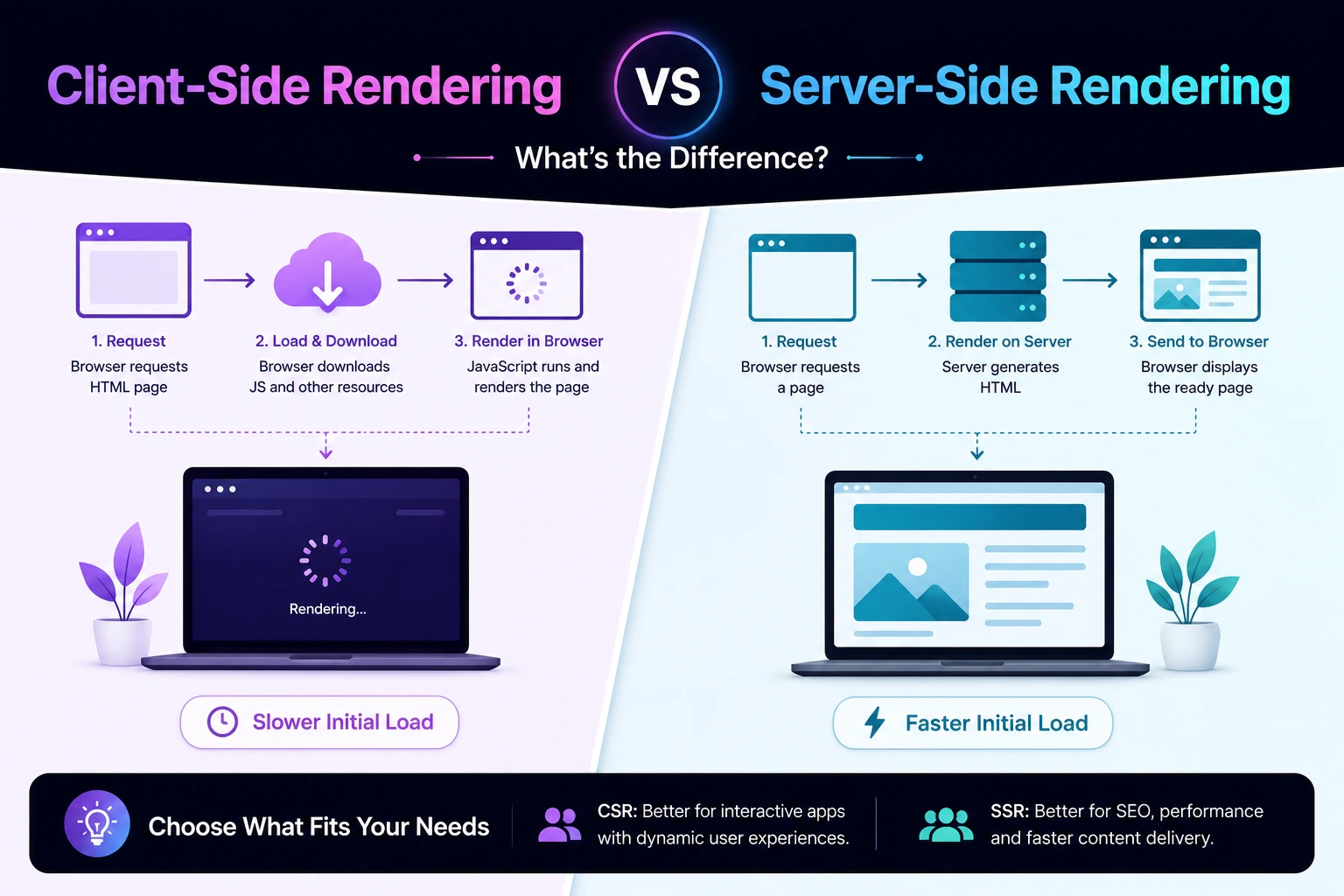
Client-Side Rendering vs Server-Side Rendering: What's the Difference
Client-Side Rendering and Server-Side Rendering describe where an application generates the HTML users initially receive.
With Client-Side Rendering (CSR), the browser downloads JavaScript and uses it to create much of the page. With Server-Side Rendering (SSR), the server generates HTML for each request and sends that HTML to the browser.
The choice affects:
- Initial loading performance
- JavaScript requirements
- Search-engine discovery
- Social-media previews
- Server infrastructure
- Caching
- Personalization
- Application complexity
- Resilience on slow devices and networks
However, CSR and SSR are not the only choices. Modern frameworks can combine client rendering, server rendering, static generation, streaming, and selective hydration within the same application.
This guide explains the trade-offs and provides a practical framework for selecting the right strategy.
What Does “Rendering” Mean?
Rendering is used to describe several related browser and application processes.
In the context of CSR and SSR, rendering usually refers to generating HTML from:
- Components
- Templates
- Application data
- Route information
- User state
The browser still performs its own visual rendering process after receiving HTML. It parses the document, applies CSS, builds layout information, and paints pixels to the screen.
The CSR-versus-SSR question is therefore more specific:
Where is the page’s initial HTML generated?
It can be generated:
- In the browser
- On the application server
- During a build process
- At an edge location
- Through a combination of these approaches
What Is Client-Side Rendering?
Client-Side Rendering generates most of the page in the browser using JavaScript.
The server may initially return a small HTML document:
<!doctype html>
<html lang="en">
  <head>
    <title>Products</title>
  </head>
  <body>
    <div id="app"></div>
    <script src="/assets/app.js"></script>
  </body>
</html>
After receiving the document, the browser:
- Downloads the JavaScript bundle.
- Parses and executes the JavaScript.
- Starts the application.
- Requests data from an API.
- Creates the page content.
- Attaches event handlers.
- Updates the interface as the user interacts.
The user may initially see an empty container, loading screen, or partial interface while these steps complete.
A Simple CSR Example
async function renderProducts() {
  const response = await fetch("/api/products");
  const products = await response.json();

  const app = document.querySelector("#app");

  app.innerHTML = products.map(product => `
    <article>
      <h2>${escapeHtml(product.name)}</h2>
      <p>${escapeHtml(product.price)}</p>
    </article>
  `).join("");
}
The browser receives the data and creates the product markup.
Production applications should use their framework’s safe templating behavior rather than constructing HTML from untrusted values. The example is intended only to demonstrate where rendering occurs.
Advantages of Client-Side Rendering
Smooth in-application navigation
Once the application and its shared code have loaded, navigation can update the interface without downloading a complete HTML document for every route.
Rich interactions
CSR is suitable for interfaces that update continuously:
- Dashboards
- Design tools
- Chat applications
- Project-management software
- Data explorers
- Email clients
- Browser-based editors
Clear API separation
A client-rendered application can consume the same API as mobile applications and external integrations.
This separation can be useful, although it also introduces more network requests and distributed-system concerns.
Static hosting for the application shell
The HTML shell and JavaScript assets can often be served from object storage or a CDN.
The APIs still require servers or managed backend services, so CSR does not eliminate backend infrastructure.
Disadvantages of Client-Side Rendering
More work before useful content appears
A browser may need to download, parse, compile, and execute JavaScript before it can show meaningful content.
This can be especially noticeable on:
- Low-end mobile devices
- Slow network connections
- Large JavaScript bundles
- Pages with several API requests
- Applications with expensive initialization
Strong JavaScript dependency
If the bundle fails to load or execute, the application may show little or no content.
Possible causes include:
- Network failures
- Browser-extension interference
- JavaScript errors
- Unsupported browser features
- Blocked third-party dependencies
- Deployment version mismatches
Potential loading waterfalls
A CSR page may require:
- The HTML shell
- The JavaScript bundle
- Application initialization
- An API request
- Additional images or modules
Each dependent step can delay content.
Search and crawler considerations
Google can render JavaScript and uses rendered HTML for indexing. However, JavaScript must remain accessible, render successfully, and expose the same meaningful content users receive.
Other search engines, social-preview crawlers, link unfurlers, archival tools, and automated clients may have more limited JavaScript support.
CSR is therefore not automatically “bad for SEO,” but it creates additional failure points that should be tested.
What Is Server-Side Rendering?
Server-Side Rendering generates HTML on the server for each request.
The process usually looks like this:
- The browser requests a URL.
- The server resolves the route.
- The server retrieves required data.
- The server renders the component or template.
- The server returns HTML.
- The browser displays the document.
- JavaScript may load and make the page interactive.
Example response:
<main>
  <article>
    <h2>Laptop</h2>
    <p>$1,200</p>
  </article>
</main>
The main content exists in the response before application JavaScript executes.
SSR does not necessarily mean a traditional multi-page application. Frameworks can send server-rendered HTML for the first request and then use client-side routing for later navigation.
Advantages of Server-Side Rendering
Content is present in the initial response
Users and crawlers can access meaningful HTML without waiting for client-side data fetching and rendering.
This is useful for:
- Articles
- Documentation
- Product pages
- Category pages
- Public profiles
- Landing pages
- News content
Fewer client-side loading stages
The server can fetch data before returning the document, avoiding some browser-side request waterfalls.
More reliable previews
Social-media crawlers and messaging applications can read server-generated:
- Titles
- Descriptions
- Canonical links
- Open Graph metadata
- Image metadata
Many preview bots do not execute a complete client application.
Less JavaScript may be required
SSR makes it possible to deliver useful HTML with less client-side JavaScript.
This benefit is not automatic. An SSR application can still send a large hydration bundle.
Disadvantages of Server-Side Rendering
Server computation
Rendering every request consumes server resources.
The effect depends on:
- Traffic
- Template complexity
- Data-fetching latency
- Cache effectiveness
- Personalization
- Rendering runtime
- Deployment architecture
Time to First Byte can increase
The browser may wait while the server fetches data and renders the page.
If server work is slow, SSR can produce worse initial performance than cached static content or a lightweight client application.
Caching is more complicated
Personalized SSR responses cannot always be shared through a public CDN cache.
Applications must correctly define:
- Public versus private responses
- Cache keys
- User-specific data
- Cookies
- Revalidation
- Invalidation
- Stale-content behavior
Incorrect caching can expose one user’s data to another.
Hydration costs
Many SSR frameworks send HTML and then execute JavaScript to recreate the component structure and attach event handlers.
Users may see a button before it becomes responsive. This creates a gap between:
- Content visibility
- Application interactivity
A page that appears quickly but responds slowly can still provide a poor experience.
What Is Hydration?
Hydration is the process of attaching client-side behavior to server-generated HTML.
The server might return:
<button id="add-to-cart">
  Add to cart
</button>
The browser then loads JavaScript that attaches the click behavior.
A simplified sequence is:
- Server sends HTML.
- Browser displays the HTML.
- Browser downloads JavaScript.
- Framework reconstructs component state.
- Event handlers become active.
Hydration can provide both server-generated content and rich interactions. However, it can also duplicate work because the server renders the component and the browser processes it again.
Potential hydration problems include:
- Large JavaScript bundles
- Slow interaction readiness
- Server/client markup mismatches
- Components rendered differently because of time zones or random values
- Event handlers becoming active late
CSR vs SSR Comparison
| Consideration | Client-Side Rendering | Server-Side Rendering |
|---|---|---|
| Initial HTML | Usually an application shell | Contains route content |
| Initial JavaScript dependency | Usually high | Varies |
| Initial server-rendering cost | Low | Potentially higher |
| Backend/API requirements | Usually still required | Required for dynamic rendering |
| First content | May wait for JavaScript and data | May appear sooner if the server is fast |
| Time to First Byte | Can be low for a cached shell | Can increase due to server work |
| Search discovery | Possible, but dependent on successful rendering | Content is available directly in HTML |
| Social previews | Requires separate metadata handling | Usually simpler |
| In-app navigation | Often client-driven | Can be server- or client-driven |
| Personalization | Often loaded after startup | Can be rendered into the response |
| CDN caching | Easy for the application shell | Easy only for cacheable responses |
| Failure behavior | Can fail if JavaScript fails | Initial content may remain available |
| Infrastructure | Static shell plus APIs | Rendering runtime plus data services |
| Interactivity | Built into client application | Usually requires hydration or separate scripts |
These are tendencies, not guarantees. Architecture and implementation quality matter more than the label alone.
Does SSR Automatically Improve Performance?
No.
SSR may improve the time until content becomes visible, but it can perform poorly when:
- Server data fetching is slow
- Rendering is expensive
- Every request bypasses caching
- The server is far from the user
- The HTML response is large
- Hydration JavaScript is excessive
- Third-party scripts block the browser
- Traffic overwhelms rendering capacity
Similarly, CSR can perform well when:
- The application bundle is small
- The shell is cached
- Data requests are fast
- Code is split by route
- Users remain in the application for long sessions
- The interface is primarily interactive
- Public search discovery is unimportant
Measure actual user experience instead of assuming one approach is faster.
Metrics to Compare
Measure at least:
- Time to First Byte: How quickly the first response bytes arrive
- First Contentful Paint: When initial content appears
- Largest Contentful Paint: When the main visible content appears
- Interaction to Next Paint: How responsive interactions are
- Cumulative Layout Shift: Whether content moves unexpectedly
- JavaScript transferred
- JavaScript execution time
- Hydration duration
- API request waterfalls
- Server-rendering duration
- Cache-hit ratio
- Error rate
Test on realistic mobile hardware and network conditions. A local development computer can hide expensive JavaScript and server latency.
Is SSR Better for SEO?
SSR can make public content easier and more reliable for crawlers to retrieve, but it does not automatically improve rankings.
Google can index JavaScript-rendered content when:
- Googlebot can access the JavaScript and API resources
- The application returns a successful status
- Rendering completes successfully
- The rendered page contains the intended content
- Internal links are crawlable
- Metadata and canonical signals are correct
Google recommends server-side rendering, static rendering, or hydration where appropriate because pre-rendered content can be faster for users and crawlers, and not every bot executes JavaScript.
SSR does not compensate for:
- Thin or duplicated content
- Incorrect canonical tags
noindexdirectives- Broken internal links
- Soft 404 pages
- Poor titles
- Unhelpful content
- Slow server responses
Think of SSR as a delivery strategy, not an SEO ranking shortcut.
Test What Crawlers Actually Receive
For a public route, check:
- The raw HTML response
- The rendered DOM
- HTTP status code
- Page title and meta description
- Canonical link
- Robots directives
- Structured data
- Internal links
- Main text content
- Error and empty states
In Search Console, inspect the live URL and rendered page. Confirm that Google receives the same essential content as users.
Static Site Generation
Static Site Generation, or SSG, creates HTML before a user requests the page—usually during deployment or a build process.
The generated files can be served directly from a CDN.
SSG works well for:
- Documentation
- Blog articles
- Marketing pages
- Help centers
- Portfolios
- Public content that changes infrequently
Advantages
- Fast cached responses
- Low server-rendering cost
- Reliable crawlable HTML
- Simple CDN distribution
- Smaller attack surface for content pages
Disadvantages
- Long builds for very large sites
- Content can become stale
- Updates may require rebuilding
- Request-specific personalization is limited
- Highly dynamic data needs client fetching or another rendering method
For many content websites, the real decision is not CSR versus SSR. It is often static generation versus SSR, with small client-side components added where necessary.
Incremental and On-Demand Generation
Some frameworks can generate a static page and refresh it after a time period or in response to a content update.
This approach can provide:
- CDN-speed delivery
- Fresh content
- Less per-request rendering
- Better scalability than uncached SSR
It introduces its own decisions:
- How stale may the content become?
- What triggers regeneration?
- What happens during a failed refresh?
- Can old content remain available?
- How are cache entries invalidated?
Use it when content changes regularly but does not need to be personalized for every request.
Streaming Server Rendering
Traditional SSR waits for the entire document to be ready.
Streaming SSR can send the page in sections:
- Send the document shell.
- Send content that is ready.
- Display loading boundaries for slow sections.
- Stream remaining sections later.
- Hydrate interactive components when appropriate.
Streaming can improve perceived performance when one slow data source would otherwise block the whole page.
It does not eliminate server latency, hydration costs, or application complexity. Loading states must remain accessible and visually stable.
Partial Hydration and Islands
Some architectures send mostly static HTML and hydrate only interactive sections.
For example, a product page might contain:
- Static server-rendered product information
- An interactive image gallery
- A client-side cart button
- A dynamic stock indicator
- A static footer
Only the interactive “islands” require client JavaScript.
This can reduce:
- JavaScript transfer
- Main-thread work
- Hydration time
- Failure surface
It is particularly useful when most content is static but a few components need interactivity.
Server and Client Components
Some frameworks divide components by execution environment.
Server components can:
- Access server-side data sources
- Keep secrets off the client
- Reduce client JavaScript
- Render noninteractive content
Client components can:
- Handle browser events
- Use browser APIs
- Maintain interactive state
- Update without a full navigation
In modern Next.js, for example, server and client components can be combined within the same route rather than choosing one rendering mode for the entire application.
The exact terminology and behavior differ among frameworks.
When CSR Is a Good Choice
Consider CSR when:
- The application is behind authentication
- Search indexing is not required
- Users remain for long sessions
- The interface changes continuously
- Most views depend on user-specific data
- Offline behavior is important
- The application resembles a desktop tool
- Fast in-app transitions matter more than public first-page discovery
Common examples include:
- Internal dashboards
- Administrative panels
- Project-management tools
- Chat interfaces
- Data-analysis applications
- Browser-based editors
Even in these applications, the login, help, pricing, and marketing pages may use static or server rendering.
When SSR Is a Good Choice
Consider SSR when:
- Content changes for every request
- Public routes need immediately available HTML
- Request-specific personalization is required
- Search and social discovery matter
- Data changes too frequently for build-time generation
- The server can retrieve required data efficiently
- Correct cache boundaries are understood
Examples include:
- Personalized account pages
- Search-results pages
- Frequently changing inventory pages
- Location-dependent content
- Authenticated pages with server-known state
Do not choose request-time SSR when the same response could be safely generated once and cached.
When Static Generation Is Better
Consider static generation when:
- Content is public
- Most visitors receive the same page
- Updates are controlled by a CMS or deployment process
- Low latency is important
- Personalization is minimal
- Content can tolerate a short delay before updates appear
Examples include:
- Blog posts
- Documentation
- Product guides
- Landing pages
- Company information
- Policy pages
Static pages can still include client-side search, forms, calculators, and other interactive components.
A Practical Hybrid Architecture
A typical application might use:
| Route | Suggested strategy |
|---|---|
| Homepage | Static generation |
| Blog articles | Static or incremental generation |
| Product details | Static generation, incremental generation, or cached SSR |
| Search results | SSR or CSR, depending on discovery needs |
| Public user profile | Static generation or SSR |
| User dashboard | CSR or personalized SSR |
| Account settings | CSR with server APIs |
| Checkout | Server-validated hybrid flow |
| Documentation | Static generation |
| Live chat | CSR |
Choose per route and component rather than forcing one strategy on the entire project.
A Decision Framework
Ask these questions for each route.
1. Must search engines index the content?
If yes, return meaningful content in the initial or reliably rendered HTML. Static generation or SSR reduces rendering dependencies.
2. Is the response the same for most users?
If yes, static generation or shared caching may be more efficient than per-request SSR.
3. Does the page require request-time personalization?
If yes, consider SSR for the personalized sections or load private data on the client.
4. How fresh must the content be?
Choose among:
- Build-time generation
- Timed revalidation
- Event-driven regeneration
- Cached SSR
- Request-time SSR
- Client-side fetching
5. How interactive is the route?
A static article needs little JavaScript. A design editor may require a full client application.
6. What happens when JavaScript fails?
Decide whether the page must remain readable or functional.
7. What is the operational budget?
SSR adds rendering capacity, observability, caching, and failure modes. CSR adds JavaScript, API, and browser-performance costs.
Common Mistakes
Treating SSR as an automatic SEO solution
SSR makes HTML available earlier but does not make weak content useful or correct technical SEO errors.
Shipping the complete application during hydration
Server-rendering the HTML provides limited benefit if the browser still downloads and executes an enormous JavaScript bundle.
Rendering personalized data into public caches
Incorrect cache configuration can expose private information.
Using CSR for every public content page
A public article usually does not need to wait for a client application before displaying its text.
Using SSR for content that rarely changes
Static generation may deliver the same HTML with lower latency and infrastructure cost.
Hiding essential content behind interactions
Crawlers and users may not activate tabs, buttons, scrolling behavior, or consent flows that load important content.
Measuring only a fast development computer
Test slow networks, low-end mobile hardware, cold caches, high server load, and failed API requests.
Forgetting status codes
A client-rendered error page may visually show “not found” while the server returns 200. Return correct 404, 410, 401, 403, and 500 responses where appropriate.
Implementation Checklist
Content and SEO
- Main public content is available to crawlers
- Every route has a unique title
- Canonical URLs are correct
- Internal links use crawlable anchors
- Structured data exists in rendered output
- Error pages return correct status codes
- Social metadata is available without client execution
Client performance
- JavaScript is split by route and feature
- Unused code is removed
- Third-party scripts are controlled
- Hydration cost is measured
- Long tasks are monitored
- Interactive components remain responsive
- Layout space is reserved for asynchronous content
Server performance
- Rendering time is measured
- Data requests run efficiently
- Independent requests run in parallel
- Timeouts are defined
- Cache behavior is documented
- Personalized responses are private
- Server failures have safe fallbacks
Testing
- Raw HTML is inspected
- Rendered HTML is inspected
- JavaScript-disabled behavior is understood
- Search Console rendering is checked
- Mobile performance is tested
- Slow API responses are simulated
- Hydration mismatches are monitored
- Real-user metrics are collected
Final Thoughts
Client-Side Rendering and Server-Side Rendering are not opposing technologies from which an entire application must choose only one.
CSR is often appropriate for highly interactive, authenticated applications. SSR is useful when content must be generated for each request and available in the initial response. Static generation is usually the simplest option for public content that changes infrequently.
Modern applications commonly combine:
- Static HTML for stable public content
- Server rendering for dynamic routes
- Client rendering for private interactions
- Streaming for slow page sections
- Selective hydration for interactive components
- CDN caching for shared responses
The best strategy is the one that sends useful content quickly, minimizes unnecessary JavaScript and server work, preserves correct cache boundaries, and supports the route’s actual discovery and interaction requirements.
Try Next
Other utilities you might find helpful
Regex Tester
Test and debug regular expressions with live matches.
Regex Debugger
Understand regex step-by-step with explanations.
JSON Formatter
Format, validate, and minify JSON instantly.
Base64 Encoder/Decoder
Encode and decode Base64 strings and files.
SQL Explain Parser
Analyze SQL execution plans and optimize queries.
DOM Complexity Analyzer
Analyze HTML DOM structure, detect deep nesting, count nodes, and identify performance issues instantly.