
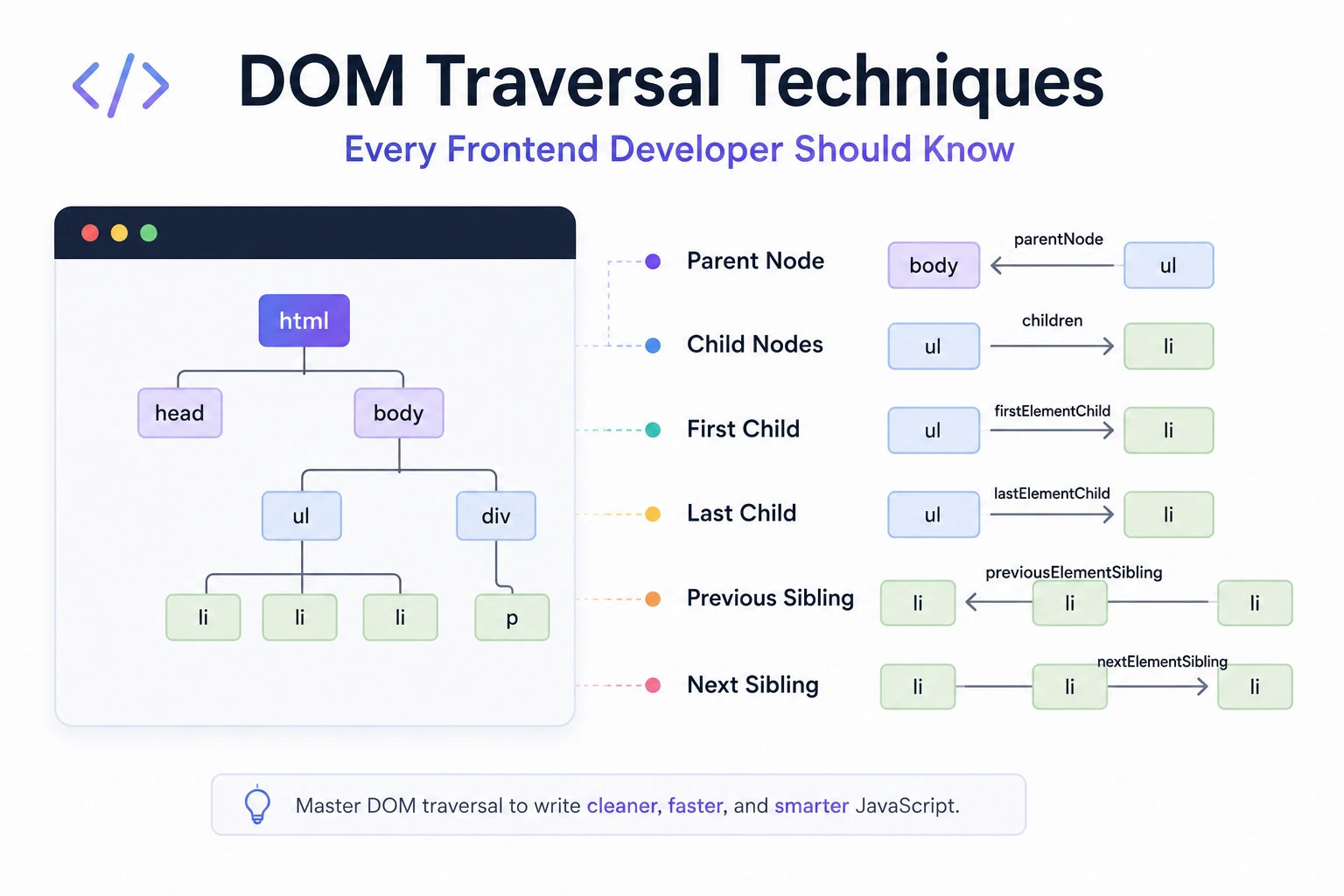
DOM Traversal Techniques Every Frontend Developer Should Know
DOM traversal means moving between related nodes in a document without repeatedly searching the entire page.
Typical relationships include:
- Parent
- Ancestor
- Child
- Descendant
- Previous sibling
- Next sibling
- Document or shadow root
JavaScript provides two related groups of traversal APIs:
- Node traversal, which includes elements, text nodes, comments, and other node types.
- Element traversal, which skips non-element nodes.
Choosing the correct API prevents bugs caused by whitespace text nodes, changing collections, missing ancestors, and component boundaries.
Understanding the DOM Tree
Consider this HTML:
<section class="product">
  <h2>Laptop</h2>
  <p>Product description</p>
  <button type="button">Add to cart</button>
</section>
The <section> is the parent element of the heading, paragraph, and button.
Those three elements are siblings because they share the same parent.
However, the DOM can also contain text nodes representing whitespace between the elements:
section.product
├── #text
├── h2
├── #text
├── p
├── #text
├── button
└── #text
This distinction explains why firstChild may return a text node while firstElementChild returns the heading.
Node vs Element
Every HTML element is a node, but not every node is an element.
Common node types include:
DocumentDocumentFragmentElementTextComment
Use Node APIs when text and comments matter.
Use Element traversal when you need HTML elements only.
MDN’s DOM anatomy guide distinguishes general node navigation from element-tree navigation.
Select a Starting Element Safely
const product =
  document.querySelector(".product");

if (!product) {
  throw new Error(
    "Product component was not found."
  );
}
querySelector() returns:
- The first matching element
nullwhen no match exists
Do not assume a selector always succeeds:
document
  .querySelector(".missing")
  .classList.add("active");
This throws because the result is null.
Use a guard, optional chaining, or an application assertion depending on whether the element is optional.
Optional element:
document
  .querySelector(".optional-banner")
  ?.classList.add("ready");
Required component:
const dialog =
  document.querySelector(
    "[data-component='checkout-dialog']"
  );

if (!(dialog instanceof HTMLElement)) {
  throw new Error(
    "Checkout dialog is required."
  );
}
Traversing to a Parent
parentElement
Returns the direct parent when that parent is an element:
const button =
  document.querySelector(
    ".product button"
  );

const product =
  button?.parentElement;
The result can be null, such as when the node has no parent element.
parentNode
Returns the parent node, which may be:
- An element
- A document
- A document fragment
- A shadow root
null
const parentNode =
  button?.parentNode;
Use parentElement when the code specifically needs an HTML or SVG element.
Use parentNode when non-element roots matter.
Finding an Ancestor with closest()
closest() starts with the element itself and then searches upward for a matching ancestor.
const button =
  document.querySelector(
    "[data-action='add-to-cart']"
  );

const product =
  button?.closest(".product");
If the button itself matches .product, closest() returns the button. Otherwise, it checks each ancestor.
The result is null if no match exists.
Reusable component example
<article
  class="product-card"
  data-product-id="42"
>
  <h2>Laptop</h2>

  <div class="actions">
    <button
      type="button"
      data-action="add"
    >
      Add to cart
    </button>
  </div>
</article>
const button =
document.querySelector(
"[data-action='add']"
);
const card =
button?.closest(".product-card");
const productId =
card?.dataset.productId;This is more resilient than calling parentElement several times:
button
  .parentElement
  .parentElement;
The chained version depends on an exact wrapper structure.
Traversing Child Elements
children
Returns the direct child elements:
const list =
  document.querySelector(".product-list");

if (list) {
  console.log(list.children);
}
children returns a live HTMLCollection. It updates when matching child elements are added or removed.
It does not include text or comment nodes.
Convert it to an array when you need array methods or a stable snapshot:
const items = [
  ...list.children
];

const visibleItems =
  items.filter(item => {
    return !item.hidden;
  });
childNodes
Returns all direct child nodes:
const nodes =
  list.childNodes;
This can include:
- Elements
- Text nodes
- Comments
Use it when text and comments are meaningful, such as when building an editor, syntax tool, or DOM inspector.
Do not treat childNodes as a mistake. It serves a different purpose from children.
firstElementChild and lastElementChild
const firstItem =
  list.firstElementChild;

const lastItem =
  list.lastElementChild;
These return direct child elements or null.
Compare with:
list.firstChild;
list.lastChild;
The Node versions may return whitespace text nodes.
Checking Whether Children Exist
For any child node:
if (list.hasChildNodes()) {
  console.log("Contains nodes");
}
For child elements only:
if (list.childElementCount > 0) {
  console.log("Contains elements");
}
Or:
if (list.firstElementChild) {
  console.log("Contains an element");
}
Traversing Sibling Elements
nextElementSibling
const heading =
  document.querySelector(
    ".product h2"
  );

const description =
  heading?.nextElementSibling;
It skips text and comment nodes.
previousElementSibling
const button =
  document.querySelector(
    ".product button"
  );

const previous =
  button?.previousElementSibling;
Node-level sibling properties
heading?.nextSibling;
heading?.previousSibling;
These may return whitespace text nodes.
Use the Element versions for normal component traversal.
Structural Traversal Can Be Fragile
This code assumes the error element immediately follows the input:
const error =
  input.nextElementSibling;
It can break when a helper element is inserted between them.
A more explicit relationship may be safer:
<label for="email">Email</label>

<input
  id="email"
  name="email"
  aria-describedby="email-error"
>

<p id="email-error" role="alert"></p>
const input =
document.querySelector("#email");
const errorId =
input?.getAttribute(
"aria-describedby"
);
const error =
errorId
? document.getElementById(errorId)
: null;Use sibling traversal when sibling order is part of the component contract. Use explicit IDs, data attributes, or component references when the relationship should survive markup changes.
Finding Descendants
querySelector()
Returns the first matching descendant:
const saveButton =
  dialog.querySelector(
    "[data-action='save']"
  );
Calling it on dialog scopes the search to that component rather than the entire document.
querySelectorAll()
Returns a static NodeList:
const fields =
  dialog.querySelectorAll(
    "input, select, textarea"
  );
“Static” means the collection does not automatically gain elements added later.
const items =
  list.querySelectorAll(".item");

list.append(
  document.createElement("li")
);

console.log(items.length);
// Original snapshot length
Run the query again if the current set is required.
getElementsByClassName()
Returns a live HTMLCollection:
const items =
  list.getElementsByClassName(
    "item"
  );
The collection updates when matching elements are added, removed, or have their class changed.
Live collections can be useful, but they can also change while being iterated.
Live Collection Trap
const items =
  list.getElementsByClassName(
    "selected"
  );

for (
  let index = 0;
  index < items.length;
  index++
) {
  items[index]
    .classList
    .remove("selected");
}
Removing the class changes the live collection, potentially causing elements to be skipped.
Use a snapshot:
const items = [
  ...list.getElementsByClassName(
    "selected"
  )
];

for (const item of items) {
  item.classList.remove("selected");
}
Understand whether the API returns a live or static collection before modifying the DOM during iteration.
Test Whether an Element Matches
matches() checks whether an element satisfies a CSS selector:
if (
  element.matches(
    "[data-action='delete']"
  )
) {
  console.log("Delete control");
}
It is useful in:
- Event delegation
- Component initialization
- Filtering descendants
- Conditional traversal
The method tests the element itself. It does not search ancestors or descendants.
Use closest() for ancestor matching.
Test Containment with contains()
if (dialog.contains(button)) {
  console.log(
    "Button belongs to dialog"
  );
}
contains() returns true when the argument is:
- The node itself
- A descendant
Therefore:
dialog.contains(dialog);
// true
This detail matters when enforcing component boundaries.
MDN defines contains() as checking whether a node is itself or a descendant.
Event Delegation with Traversal
Event delegation places one listener on a stable ancestor and finds the relevant descendant after an event bubbles.
HTML:
<ul class="task-list">
  <li class="task" data-task-id="1">
    <span>Review pull request</span>
    <button
      type="button"
      data-action="complete"
    >
      Complete
    </button>
  </li>
</ul>
JavaScript:
const taskList =
  document.querySelector(
    ".task-list"
  );

taskList?.addEventListener(
  "click",
  event => {
    if (
      !(event.target instanceof Element)
    ) {
      return;
    }

    const button =
      event.target.closest(
        "[data-action='complete']"
      );

    if (
      !button ||
      !taskList.contains(button)
    ) {
      return;
    }

    const task =
      button.closest(".task");

    if (
      !task ||
      !taskList.contains(task)
    ) {
      return;
    }

    task.classList.toggle(
      "task--complete"
    );
  }
);
Why the containment check matters
A nested component may contain a matching selector that belongs to a different logical owner.
This check:
taskList.contains(button)ensures the discovered element remains within the intended list.
Delegation advantages
- Supports dynamically added children
- Centralizes related behavior
- Can reduce repeated listener setup
- Works well for large lists
Delegation trade-offs
- Not every event bubbles
- Target matching becomes more complex
- Nested components can conflict
- Shadow DOM changes event retargeting
- Individual listeners may be clearer for small components
Event delegation is a design tool, not a universal performance requirement.
Navigating a Complete Ancestor Chain
function getAncestors(element) {
  const ancestors = [];

  let current =
    element.parentElement;

  while (current) {
    ancestors.push(current);
    current =
      current.parentElement;
  }

  return ancestors;
}
Usage:
const ancestors =
  getAncestors(button);
If the code needs only one matching ancestor, closest() is more direct.
Avoid repeatedly building ancestor arrays in high-frequency event handlers unless the result is genuinely needed.
Walking a Subtree with TreeWalker
For structured traversal beyond CSS selectors, use TreeWalker.
Example: visit text nodes in an article.
const article =
  document.querySelector("article");

if (!article) {
  throw new Error(
    "Article was not found."
  );
}

const walker =
  document.createTreeWalker(
    article,
    NodeFilter.SHOW_TEXT,
    {
      acceptNode(node) {
        return node.textContent.trim()
          ? NodeFilter.FILTER_ACCEPT
          : NodeFilter.FILTER_REJECT;
      }
    }
  );

const textNodes = [];

while (walker.nextNode()) {
  textNodes.push(
    walker.currentNode
  );
}
TreeWalker is useful for:
- Text analysis
- Editors
- Search highlighting
- Accessibility tools
- Document transformations
- DOM inspection
Within TreeWalker, “visible” means accepted by its filter—not visible on the screen.
NodeIterator
NodeIterator also traverses nodes matching a filter.
const iterator =
  document.createNodeIterator(
    article,
    NodeFilter.SHOW_ELEMENT,
    node => {
      return node.matches(
        "h2, h3, h4"
      )
        ? NodeFilter.FILTER_ACCEPT
        : NodeFilter.FILTER_REJECT;
    }
  );

const headings = [];

let current;

while (
  (current = iterator.nextNode())
) {
  headings.push(current);
}
Use CSS selectors for ordinary descendant searches. Use walkers or iterators when processing a tree node by node with custom filtering.
Document Fragments and Detached Trees
Traversal is not limited to nodes currently connected to the page.
const fragment =
  document.createDocumentFragment();

const section =
  document.createElement("section");

const heading =
  document.createElement("h2");

heading.textContent =
  "Account settings";

section.append(heading);
fragment.append(section);

console.log(
  heading.parentElement === section
);
// true
The nodes have parent-child relationships even though they are not yet attached to the document.
Check whether a node is connected:
console.log(section.isConnected);
// false

document.body.append(fragment);

console.log(section.isConnected);
// true
Finding the Root with getRootNode()
const root =
  element.getRootNode();
The result may be:
DocumentShadowRootDocumentFragment- A detached root element
To request the composed root across a shadow boundary:
const composedRoot =
  element.getRootNode({
    composed: true
  });
MDN documents how getRootNode() identifies document, fragment, and shadow roots.
Traversal and Shadow DOM
Normal ancestor traversal does not behave like one uninterrupted light-DOM tree across shadow boundaries.
Inside a shadow root:
parentElementstops within that treeclosest()does not automatically cross to the host- Events can be retargeted
- Some events expose a composed path
Example:
component.addEventListener(
  "click",
  event => {
    const path =
      event.composedPath();

    const action = path.find(
      node => {
        return (
          node instanceof Element &&
          node.matches(
            "[data-action]"
          )
        );
      }
    );

    if (action) {
      handleAction(action);
    }
  }
);
Use composedPath() only when the component intentionally handles events across shadow boundaries.
Respect encapsulation rather than reaching into another component’s private shadow tree.
Practical Accordion Example
HTML:
<div
  class="accordion"
  data-component="accordion"
>
  <section class="accordion-item">
    <h2>
      <button
        type="button"
        aria-expanded="false"
      >
        Shipping
      </button>
    </h2>

    <div hidden>
      Shipping details
    </div>
  </section>
</div>
JavaScript:
const accordion =
  document.querySelector(
    "[data-component='accordion']"
  );

accordion?.addEventListener(
  "click",
  event => {
    if (
      !(event.target instanceof Element)
    ) {
      return;
    }

    const button =
      event.target.closest(
        "button[aria-expanded]"
      );

    if (
      !button ||
      !accordion.contains(button)
    ) {
      return;
    }

    const item =
      button.closest(
        ".accordion-item"
      );

    const panel =
      item?.querySelector(
        ":scope > div"
      );

    if (!panel) {
      return;
    }

    const expanded =
      button.getAttribute(
        "aria-expanded"
      ) === "true";

    button.setAttribute(
      "aria-expanded",
      String(!expanded)
    );

    panel.hidden = expanded;
  }
);
This uses:
- Delegation
closest()contains()- Scoped descendant querying
- Explicit accessibility state
Practical List Removal Example
const list =
  document.querySelector(
    "[data-component='user-list']"
  );

list?.addEventListener(
  "click",
  event => {
    if (
      !(event.target instanceof Element)
    ) {
      return;
    }

    const removeButton =
      event.target.closest(
        "[data-action='remove']"
      );

    if (
      !removeButton ||
      !list.contains(removeButton)
    ) {
      return;
    }

    const row =
      removeButton.closest(
        "[data-user-id]"
      );

    if (
      !row ||
      !list.contains(row)
    ) {
      return;
    }

    row.remove();
  }
);
In a real application, confirm authorization and server success rather than treating DOM removal as data deletion.
Caching DOM References
Caching a stable reference can improve clarity:
const menu =
  document.querySelector(
    "[data-component='menu']"
  );

menu?.classList.add("ready");
menu?.setAttribute(
  "aria-busy",
  "false"
);
But caching is not always better.
A cached reference can become:
- Disconnected from the document
- Stale after a framework rerender
- An unintended memory-retention source
- Incorrect after navigation
Check connectivity if necessary:
if (menu?.isConnected) {
  menu.classList.add("active");
}
Query cost is rarely the first bottleneck in ordinary interface code. Optimize repeated searches only after measurement or when the cached reference makes ownership clearer.
Framework-Owned DOM
React, Vue, Angular, and similar frameworks expect to control the DOM inside their mounted roots.
Avoid directly changing framework-owned nodes:
frameworkRoot
  .querySelector(".status")
  .textContent = "Complete";
The framework may overwrite the change during its next render.
Prefer:
- Component state
- Props or inputs
- Template references
- Framework refs
- Framework lifecycle APIs
Direct traversal remains appropriate for:
- Integrating non-framework libraries
- Managing focus
- Reading measurements
- Handling browser APIs
- Code outside the framework root
Perform cleanup when components unmount.
Traversal Performance Guidelines
Scope queries to component roots
Prefer:
dialog.querySelector(
  "[data-action='save']"
);
over:
document.querySelector(
  "#dialog [data-action='save']"
);
when the component reference already exists.
Avoid unnecessary repeated work
Do not query the same stable element several times in one function.
Do not optimize selector syntax blindly
Modern selector engines are optimized. JavaScript execution, layout, framework updates, and network operations are often larger costs.
Avoid layout reads in traversal loops
These APIs can request current geometry:
getBoundingClientRect()offsetWidthoffsetHeightclientWidthscrollHeight
The traversal itself may be inexpensive while the geometry read forces layout.
Clean up retained references
Long-lived caches containing removed elements can prevent garbage collection.
Measure actual interactions
Use DevTools when traversal occurs inside:
- Scroll handlers
- Pointer-move handlers
- Large loops
- Animation frames
- Frequently updated lists
Common Mistakes
Assuming firstChild returns an element
It may return a text node. Use firstElementChild when an element is required.
Assuming children is a fixed array
It is a live HTMLCollection.
Modifying a live collection while iterating
Create a snapshot first when modifications affect membership.
Calling closest() without checking for null
The desired ancestor may not exist.
Chaining multiple parentElement calls
This creates a fragile dependency on wrapper depth.
Using sibling order for semantic relationships
Use IDs, attributes, or component references when order can change.
Delegating every event to document
Use the nearest stable component root.
Assuming fewer listeners always means faster code
Handler work and event frequency are usually more important than listener count alone.
Keeping references to removed subtrees
Clear caches and perform lifecycle cleanup.
Mutating framework-owned DOM directly
Use framework state and refs.
DOM Traversal Cheat Sheet
| Goal | API |
|---|---|
| Direct parent element | parentElement |
| Direct parent node | parentNode |
| Matching ancestor | closest() |
| Child elements | children |
| All child nodes | childNodes |
| First child element | firstElementChild |
| Last child element | lastElementChild |
| Next element sibling | nextElementSibling |
| Previous element sibling | previousElementSibling |
| First matching descendant | querySelector() |
| All matching descendants | querySelectorAll() |
| Test selector match | matches() |
| Test containment | contains() |
| Get tree root | getRootNode() |
| Walk filtered nodes | TreeWalker |
| Iterate filtered nodes | NodeIterator |
| Check document connection | isConnected |
| Inspect event path | composedPath() |
Final Thoughts
Good DOM traversal is primarily about correctness and clear component relationships—not shaving microseconds from every selector.
Use:
- Element APIs when you need elements
- Node APIs when text and comments matter
closest()for matching ancestors- Scoped queries for descendants
- Event delegation for appropriate dynamic collections
TreeWalkerfor custom tree processing- Explicit relationships when sibling order is fragile
getRootNode()andcomposedPath()when Shadow DOM matters
Always account for:
nullresults- Live collections
- Detached elements
- Component boundaries
- Accessibility relationships
- Framework ownership
Try Next
Other utilities you might find helpful
Regex Tester
Test and debug regular expressions with live matches.
Regex Debugger
Understand regex step-by-step with explanations.
JSON Formatter
Format, validate, and minify JSON instantly.
Base64 Encoder/Decoder
Encode and decode Base64 strings and files.
SQL Explain Parser
Analyze SQL execution plans and optimize queries.
DOM Complexity Analyzer
Analyze HTML DOM structure, detect deep nesting, count nodes, and identify performance issues instantly.