
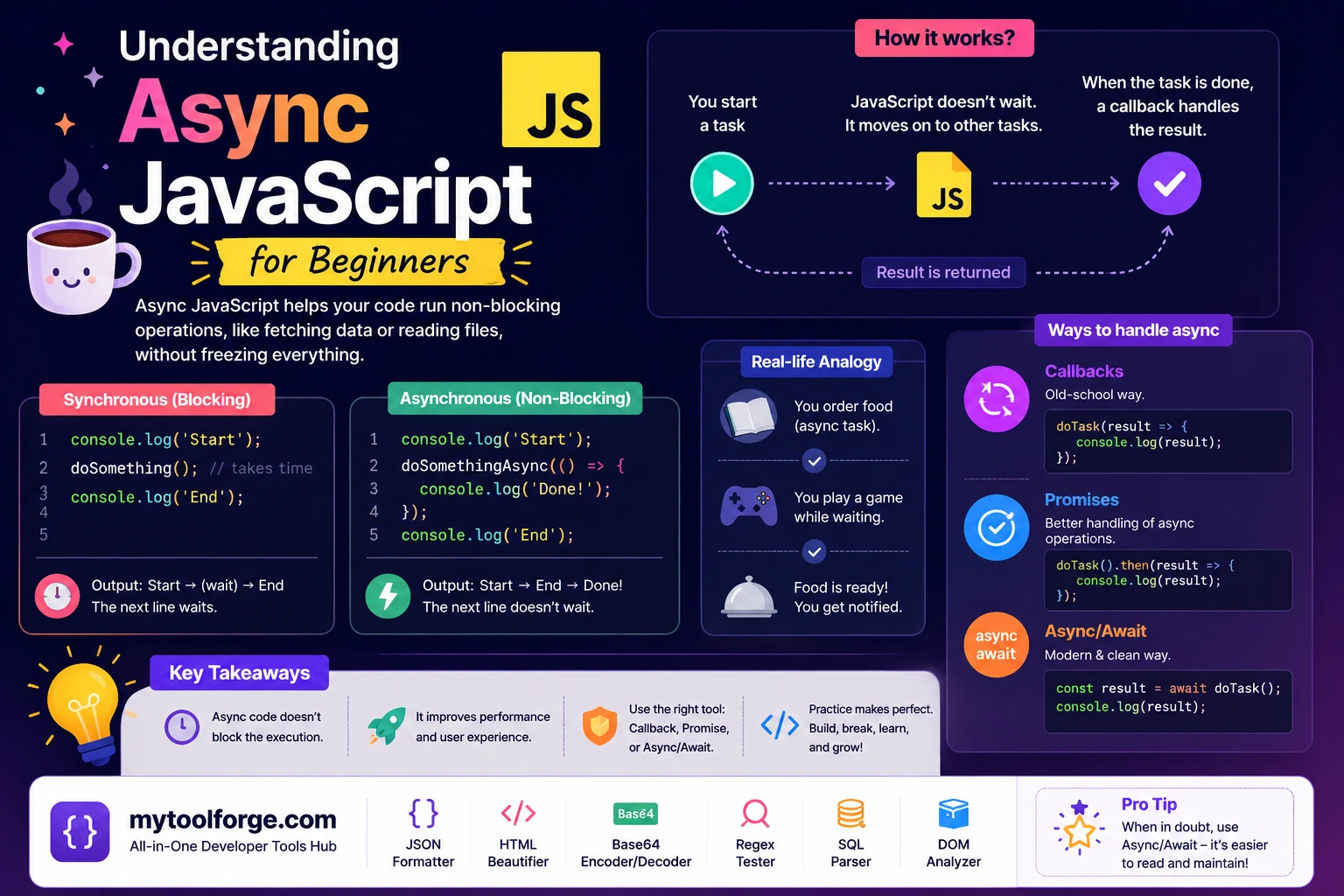
Understanding Async JavaScript for Beginners
Asynchronous JavaScript allows a program to begin an operation, continue handling other work, and process the result later.
This behavior is essential for tasks such as:
- Fetching API data
- Waiting for user input
- Reading files
- Running timers
- Accessing databases
- Uploading files
- Communicating through WebSockets
- Waiting for animations
- Calling browser APIs
The key idea is not that every asynchronous task runs JavaScript on another thread. Instead, the JavaScript runtime works with browser or server APIs that perform or monitor operations. When an operation completes, related JavaScript is scheduled to run.
To use async JavaScript correctly, you need to understand:
- Synchronous execution
- Callbacks
- Promises
asyncandawait- The event loop
- Tasks and microtasks
- Error handling
- Concurrency
- Cancellation
Synchronous JavaScript
JavaScript normally executes statements in order.
console.log("First");
console.log("Second");
console.log("Third");
Output:
First
Second
Third
Each function runs to completion before another queued JavaScript job begins.
This property makes individual blocks of JavaScript easier to reason about, but it also means that long-running synchronous code can block other work.
Synchronous Code Can Block the Main Thread
Consider a large calculation:
console.log("Starting");

const startedAt = performance.now();

while (
  performance.now() - startedAt < 3000
) {
  // Block the thread for about three seconds.
}

console.log("Finished");
In a browser, the page may be unable to respond smoothly during those three seconds.
The browser may be delayed from:
- Responding to clicks
- Processing keyboard input
- Updating animations
- Rendering new frames
- Running other JavaScript callbacks
Adding async to the function would not automatically move this loop to another thread.
What “Asynchronous” Means
An asynchronous API lets JavaScript initiate or register an operation and receive the result later.
Example:
console.log("Start");

setTimeout(() => {
  console.log("Timer finished");
}, 1000);

console.log("End");
Output:
Start
End
Timer finished
JavaScript registers the timer callback, continues executing the current script, and handles the callback later.
The timer itself is managed by the host environment. The callback still runs as JavaScript when the event loop schedules it.
setTimeout() Does Not Guarantee an Exact Time
This timer:
setTimeout(callback, 1000);means:
Do not make this callback eligible to run before approximately 1,000 milliseconds have passed.
It does not guarantee that the callback runs at exactly 1,000 milliseconds.
The callback may run later because:
- Other JavaScript is still running
- The task queue contains earlier work
- The browser throttles background tabs
- The system is under load
- The requested delay is below an enforced minimum
Example:
const start = performance.now();

setTimeout(() => {
  console.log(
    Math.round(performance.now() - start)
  );
}, 100);

const blockUntil =
  performance.now() + 1000;

while (performance.now() < blockUntil) {
  // Block for about one second.
}
Although the requested delay is 100 milliseconds, the callback cannot run while the loop is blocking JavaScript execution.
The Event Loop Mental Model
A simplified browser model includes:
- Call stack
- Host APIs
- Task queue
- Microtask queue
- Event loop
A rough sequence is:
- JavaScript runs the current task.
- Code can register timers, network operations, and events.
- The host environment monitors those operations.
- Completion schedules callbacks or promise reactions.
- The current JavaScript task finishes.
- The runtime processes queued microtasks.
- The browser may render.
- The next task is selected.
JavaScript jobs use run-to-completion behavior: one job finishes before another begins. The runtime also gives microtasks priority over the next task.
The exact scheduling model differs between browsers and Node.js, but promises, timers, and I/O remain conceptually distinct.
Tasks vs Microtasks
Timer callbacks and many browser events are processed as tasks.
Promise reactions and queueMicrotask() callbacks are processed as microtasks.
Example:
console.log("A");

setTimeout(() => {
  console.log("Timer");
}, 0);

Promise.resolve().then(() => {
  console.log("Promise");
});

queueMicrotask(() => {
  console.log("Microtask");
});

console.log("B");
Output:
A
B
Promise
Microtask
Timer
Why?
- The current script prints
A. - The timer callback is scheduled as a later task.
- The promise callback is scheduled as a microtask.
queueMicrotask()adds another microtask.- The script prints
B. - The current task finishes.
- Microtasks run in the order they were queued.
- The timer task runs afterward.
The runtime drains the microtask queue before moving to the next task.
Microtasks Can Also Cause Performance Problems
Microtasks have high scheduling priority, but that does not mean they are free.
This recursive pattern can delay timers, rendering, and input:
function scheduleForever() {
  queueMicrotask(scheduleForever);
}

scheduleForever();
Each microtask schedules another microtask, preventing the queue from becoming empty.
Keep microtask work small and avoid unbounded recursive scheduling.
What Is a Callback?
A callback is a function passed to another function to be called later or under a particular condition.
Timer callback:
setTimeout(() => {
  console.log("Finished");
}, 1000);
Event callback:
button.addEventListener(
  "click",
  () => {
    console.log("Button clicked");
  }
);
Callbacks are not obsolete. Events, array methods, streams, and many platform APIs still use them.
The difficulty appears when several dependent callback-based operations become deeply nested.
Callback Nesting
getUser(userId, (userError, user) => {
  if (userError) {
    handleError(userError);
    return;
  }

  getOrders(user.id, (orderError, orders) => {
    if (orderError) {
      handleError(orderError);
      return;
    }

    getPayment(
      orders[0].id,
      (paymentError, payment) => {
        if (paymentError) {
          handleError(paymentError);
          return;
        }

        console.log(payment);
      }
    );
  });
});
Problems include:
- Deep nesting
- Repeated error handling
- Difficult control flow
- Accidental multiple callback calls
- Harder composition
Promises provide a standard representation of a future result.
What Is a Promise?
A promise represents the eventual completion or failure of an asynchronous operation.
A promise has one of three states:
- Pending
- Fulfilled
- Rejected
Example:
const promise = new Promise(
  (resolve, reject) => {
    setTimeout(() => {
      resolve("Operation completed");
    }, 1000);
  }
);
Consume the result:
promise.then(value => {
  console.log(value);
});
Handle rejection:
promise
  .then(value => {
    console.log(value);
  })
  .catch(error => {
    console.error(error);
  });
Run cleanup regardless of outcome:
promise
  .then(handleValue)
  .catch(handleError)
  .finally(hideLoadingIndicator);
Avoid Unnecessary Promise Construction
Do not wrap an API that already returns a promise without a reason.
Unnecessary:
function getUsers() {
  return new Promise(
    (resolve, reject) => {
      fetch("/api/users")
        .then(resolve)
        .catch(reject);
    }
  );
}
Simpler:
function getUsers() {
  return fetch("/api/users");
}
The Promise constructor is appropriate when converting a genuinely callback-based API or implementing a new asynchronous abstraction.
Promise Chaining
A promise callback can return another promise:
fetch("/api/users/42")
  .then(response => {
    if (!response.ok) {
      throw new Error(
        `Request failed: ${response.status}`
      );
    }

    return response.json();
  })
  .then(user => {
    return fetch(
      `/api/orders?user=${user.id}`
    );
  })
  .then(response => {
    if (!response.ok) {
      throw new Error(
        `Request failed: ${response.status}`
      );
    }

    return response.json();
  })
  .then(orders => {
    console.log(orders);
  })
  .catch(error => {
    console.error(error);
  });
Returning the second promise is essential. Without return, the outer chain does not wait for it.
What Does async Do?
Adding async to a function means the function always returns a promise.
async function getMessage() {
  return "Hello";
}
This is equivalent in result to:
function getMessage() {
  return Promise.resolve("Hello");
}
Usage:
getMessage().then(message => {
  console.log(message);
});
Even though the function returns a string in its source code, callers receive a promise that fulfills with that string.
What Does await Do?
await waits for a promise to settle within an async function.
async function loadUser() {
  const response =
    await fetch("/api/users/42");

  const user =
    await response.json();

  return user;
}
await pauses the current async function’s continuation. It does not synchronously block the entire JavaScript environment while the network operation is pending.
When the promise settles, the function’s continuation is scheduled as a microtask.
MDN documents that async functions return promises and that await suspends the function until the awaited value settles.
await Does Not Make CPU-Heavy Code Nonblocking
This remains blocking:
async function calculate() {
  let total = 0;

  for (
    let index = 0;
    index < 2_000_000_000;
    index++
  ) {
    total += index;
  }

  return total;
}
There is no asynchronous operation inside the loop. The code still occupies the JavaScript thread until it finishes.
For CPU-intensive work in a browser, consider:
- Web Workers
- Smaller chunks that yield between tasks
- Server-side processing
- WebAssembly with appropriate threading support
In Node.js, consider worker threads or an external job system for suitable CPU-heavy tasks.
Error Handling with async and await
A rejected promise behaves like a thrown error at the await expression.
async function loadUser() {
  try {
    const response =
      await fetch("/api/users/42");

    if (!response.ok) {
      throw new Error(
        `Request failed: ${response.status}`
      );
    }

    return await response.json();
  } catch (error) {
    console.error(
      "Unable to load user:",
      error
    );

    throw error;
  }
}
Only catch an error when you can:
- Recover
- Add useful context
- Convert it into an expected result
- Perform cleanup
- Report it at the correct boundary
Avoid catching an error only to hide it:
try {
  await saveOrder();
} catch {
  // Nothing happens.
}
Silent failures are difficult to diagnose and can leave the interface in an incorrect state.
fetch() Does Not Reject for Normal HTTP Errors
This is a common beginner mistake:
try {
  const response =
    await fetch("/api/users/999");

  const user =
    await response.json();
} catch (error) {
  console.error(error);
}
A 404 normally does not cause fetch() to reject. It returns a Response with:
response.ok === falseCheck it explicitly:
async function fetchJson(url, options = {}) {
  const response =
    await fetch(url, options);

  const contentType =
    response.headers.get("content-type") ?? "";

  const hasJson =
    contentType.includes("application/json") ||
    contentType.includes("+json");

  const data = hasJson
    ? await response.json()
    : null;

  if (!response.ok) {
    const error = new Error(
      data?.message ??
      `Request failed with ${response.status}`
    );

    error.status = response.status;
    error.data = data;

    throw error;
  }

  return data;
}
The Fetch API rejects primarily for request failures such as certain network or cancellation conditions—not merely because the server returned 404 or 500.
Sequential vs Concurrent Operations
These requests run sequentially:
const user =
  await fetchUser();

const products =
  await fetchProducts();

const settings =
  await fetchSettings();
The second does not begin until the first completes.
This is correct if the operations depend on each other. If they are independent, start them together:
const userPromise =
  fetchUser();

const productsPromise =
  fetchProducts();

const settingsPromise =
  fetchSettings();

const [
  user,
  products,
  settings
] = await Promise.all([
  userPromise,
  productsPromise,
  settingsPromise
]);
Shorter version:
const [
  user,
  products,
  settings
] = await Promise.all([
  fetchUser(),
  fetchProducts(),
  fetchSettings()
]);
Concurrency can reduce total waiting time, but it should be bounded. Starting thousands of requests simultaneously can overload:
- The browser
- The network
- The API
- A database
- A third-party service
Promise.all() Behavior
Promise.all() fulfills when every input fulfills:
const results = await Promise.all([
  firstTask(),
  secondTask(),
  thirdTask()
]);
It rejects when one input rejects.
That does not guarantee the other operations stop. They may continue unless they support cancellation.
Use Promise.all() when:
- Every result is required
- The tasks are independent
- One failure should fail the combined operation
Promise.allSettled()
When every outcome should be collected:
const results =
  await Promise.allSettled([
    fetchProfile(),
    fetchRecommendations(),
    fetchNotifications()
  ]);

for (const result of results) {
  if (result.status === "fulfilled") {
    console.log(result.value);
  } else {
    console.error(result.reason);
  }
}
Use this when partial success is useful.
Do not use allSettled() merely to hide important failures. Decide explicitly which operations are optional.
The Async forEach() Trap
This code does not wait for all callbacks:
items.forEach(async item => {
  await saveItem(item);
});

console.log("Finished");
forEach() ignores the promises returned by its callback, so "Finished" may be logged before saving completes.
Sequential processing
for (const item of items) {
  await saveItem(item);
}

console.log("Finished");
Use this when order matters or only one operation should run at a time.
Concurrent processing
await Promise.all(
  items.map(item => saveItem(item))
);

console.log("Finished");
Use this only when concurrent processing is safe and the collection is reasonably bounded.
For large collections, use a concurrency-limited queue rather than starting every operation at once.
Forgotten await
const user =
  fetchUser();

console.log(user);
Output resembles:
Promise { <pending> }Correct:
const user =
  await fetchUser();
However, not every promise should be awaited immediately.
This begins operations concurrently:
const userPromise =
  fetchUser();

const productsPromise =
  fetchProducts();

const user =
  await userPromise;

const products =
  await productsPromise;
The important question is whether the operations are dependent or independent.
Floating Promises
A floating promise is created but neither awaited nor returned:
async function submitOrder() {
  saveOrder();
  showSuccessMessage();
}
If saveOrder() rejects, the error may become unhandled. The success message also appears before saving is confirmed.
Correct:
async function submitOrder() {
  await saveOrder();
  showSuccessMessage();
}
Or return the promise:
function submitOrder() {
  return saveOrder();
}
Static-analysis tools can detect many unhandled or floating promises.
Cancellation with AbortController
A user may leave a page, change a search query, or cancel an operation before a request finishes.
const controller =
  new AbortController();

const request = fetch(
  "/api/large-report",
  {
    signal: controller.signal
  }
);

cancelButton.addEventListener(
  "click",
  () => {
    controller.abort();
  }
);

try {
  const response =
    await request;

  if (!response.ok) {
    throw new Error(
      `Request failed: ${response.status}`
    );
  }
} catch (error) {
  if (error.name === "AbortError") {
    console.log("Request cancelled");
  } else {
    throw error;
  }
}
Cancellation stops the client from continuing to wait for or consume the response.
It does not guarantee that the server stops processing an operation that has already begun.
Adding a Request Timeout
async function fetchWithTimeout(
  url,
  options = {},
  timeoutMs = 5000
) {
  const controller =
    new AbortController();

  const timeoutId = setTimeout(
    () => controller.abort(),
    timeoutMs
  );

  try {
    return await fetch(url, {
      ...options,
      signal: controller.signal
    });
  } finally {
    clearTimeout(timeoutId);
  }
}
If the caller already supplies an abort signal, a production helper should combine or coordinate signals rather than silently replacing the caller’s cancellation mechanism.
Preventing Stale Search Results
Async operations can complete in a different order than they started.
A user searches for:
j
jo
john
The j request may finish after the john request and overwrite the newer results.
Cancel the previous request:
let searchController = null;

async function search(query) {
  searchController?.abort();

  searchController =
    new AbortController();

  try {
    const response = await fetch(
      `/api/search?q=${
        encodeURIComponent(query)
      }`,
      {
        signal: searchController.signal
      }
    );

    if (!response.ok) {
      throw new Error(
        `Search failed: ${response.status}`
      );
    }

    const results =
      await response.json();

    renderResults(results);
  } catch (error) {
    if (error.name !== "AbortError") {
      showSearchError(error);
    }
  }
}
Another option is assigning each request a sequence number and ignoring results from older requests.
Cleanup with finally
Use finally for cleanup that must happen after success or failure:
async function submitForm() {
  submitButton.disabled = true;
  loadingIndicator.hidden = false;

  try {
    await saveForm();
    showSuccess();
  } catch (error) {
    showError(error);
  } finally {
    submitButton.disabled = false;
    loadingIndicator.hidden = true;
  }
}
This prevents the interface from remaining permanently disabled after an error.
Retry Carefully
Automatic retries can help with temporary failures, but they can also duplicate state-changing operations.
Safer retry candidates include idempotent reads:
GET /api/productsRiskier operations include:
POST /api/payments
POST /api/orders
POST /api/emails
A timeout does not prove the server failed. The server may have completed the action while the response was lost.
For state-changing requests:
- Use application-level idempotency keys where appropriate.
- Retry only documented failure conditions.
- Use bounded exponential backoff.
- Respect
Retry-After. - Avoid unlimited retries.
- Make cancellation possible.
Callbacks, Promises, and async/await Can Coexist
“Never mix callbacks and promises” is not useful advice.
These APIs naturally use callbacks:
button.addEventListener(
  "click",
  async () => {
    await submitForm();
  }
);
The event interface uses a callback, while the implementation uses a promise.
The important rule is to maintain clear ownership of:
- Completion
- Errors
- Cancellation
- Returned promises
Avoid converting a clean promise flow into nested callbacks or mixing .then() and await in a way that obscures control flow.
Browser and Node.js Differences
The general promise and async-function behavior is part of JavaScript, but host environments differ.
Browsers provide APIs such as:
fetch()- DOM events
setTimeout()- Web Workers
- IndexedDB
Node.js provides APIs such as:
- File-system operations
- Network servers
- Streams
- Worker threads
- Process events
Node.js also has event-loop phases and scheduling details that differ from browser event loops.
Test timing-sensitive code in the environment where it will run.
Common Async JavaScript Mistakes
- Assuming
setTimeout(..., 0)runs immediately - Forgetting that microtasks run before the next timer task
- Treating
fetch()HTTP errors as rejected promises - Forgetting to return a promise from
.then() - Starting independent operations sequentially
- Starting too many operations concurrently
- Using
forEach()with an async callback - Leaving promises unhandled
- Swallowing errors in empty
catchblocks - Assuming
asyncmoves CPU work to another thread - Updating the interface with stale request results
- Forgetting loading-state cleanup
- Retrying non-idempotent operations blindly
- Ignoring cancellation
- Parsing every response as JSON
Practical Async Checklist
Before deploying asynchronous code, confirm:
- Every promise is awaited, returned, or deliberately handled.
- HTTP responses are checked with
response.ok. - Empty and non-JSON responses are handled.
- Independent operations run concurrently where appropriate.
- Dependent operations remain sequential.
- Concurrency is limited for large collections.
- Errors reach the correct application boundary.
- Loading indicators are cleared in
finally. - Requests can be cancelled when necessary.
- Stale results cannot overwrite newer state.
- Timeouts are defined where appropriate.
- Retries are bounded and safe.
- CPU-heavy work does not block the main thread.
- Automated tests cover rejection and cancellation.
Final Thoughts
Asynchronous JavaScript is easier to understand when separated into three responsibilities:
- The host environment manages or monitors timers, networking, files, and events.
- Promises and callbacks represent what should happen when an operation progresses or finishes.
- The event loop decides when queued JavaScript can run.
async and await provide readable syntax, but they do not remove the need to understand:
- Promise rejection
- Microtask scheduling
- Concurrency
- Cancellation
- Race conditions
- Main-thread blocking
The most important beginner rule is:
Every asynchronous operation should have clear ownership of its result, error, cancellation, and completion.
Once those responsibilities are explicit, async JavaScript becomes much more predictable.
Try Next
Other utilities you might find helpful
Regex Tester
Test and debug regular expressions with live matches.
Regex Debugger
Understand regex step-by-step with explanations.
JSON Formatter
Format, validate, and minify JSON instantly.
Base64 Encoder/Decoder
Encode and decode Base64 strings and files.
SQL Explain Parser
Analyze SQL execution plans and optimize queries.
DOM Complexity Analyzer
Analyze HTML DOM structure, detect deep nesting, count nodes, and identify performance issues instantly.