
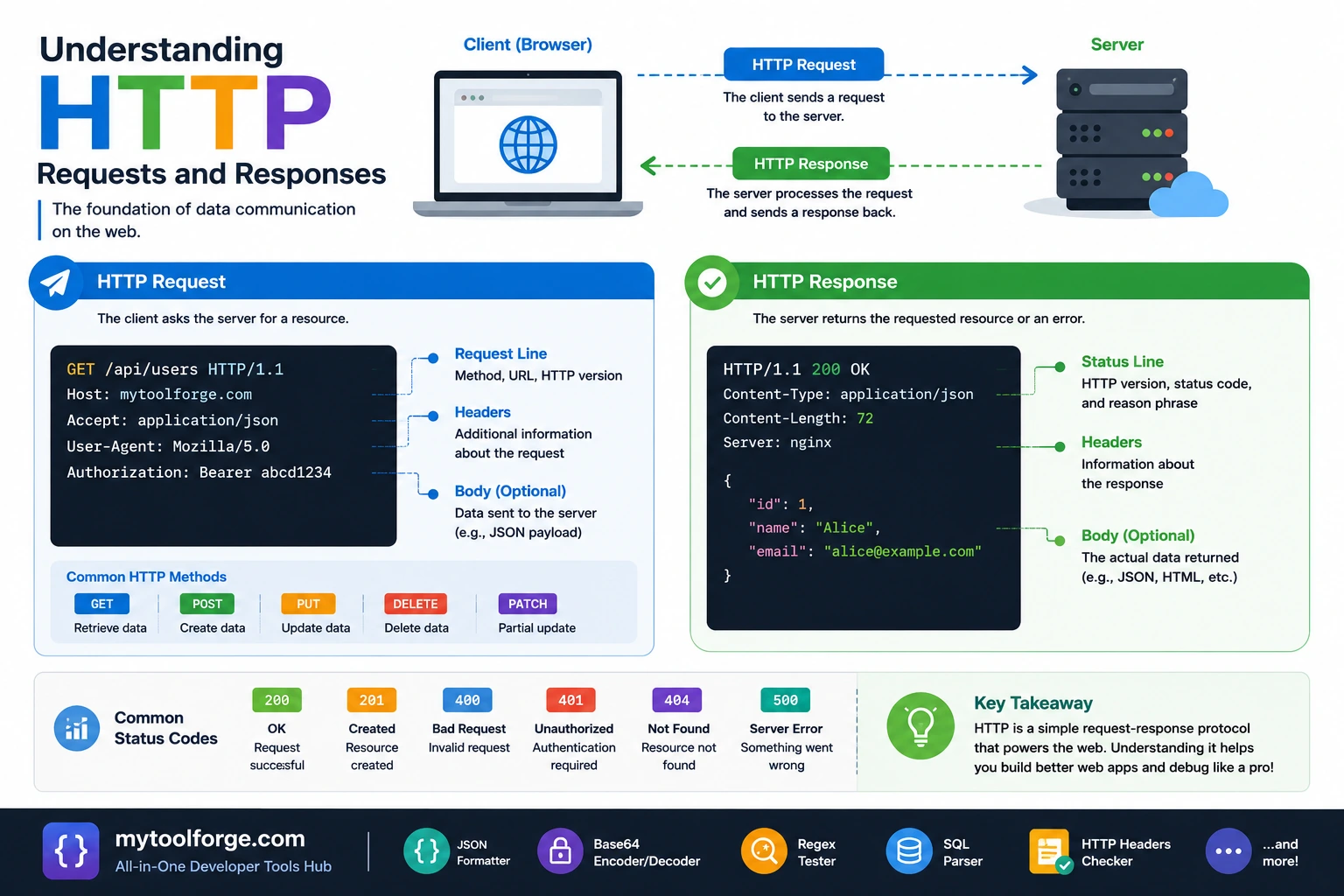
Understanding HTTP Requests and Responses
Every time a browser loads a page, a mobile application calls an API, or a webhook delivers an event, two systems exchange HTTP messages.
One system sends a request describing what it wants. Another system returns a response describing the result.
A request can ask to:
- Retrieve a document
- Submit a form
- Create a record
- Replace a resource
- Apply a partial update
- Delete data
- Download a file
- Start an operation
A response can contain:
- HTML
- JSON
- An image
- A downloadable file
- A redirect
- Cache instructions
- Authentication requirements
- An error description
- No body at all
Understanding these messages makes it easier to design APIs, debug applications, configure caching, handle authentication, and diagnose performance problems.
What Is HTTP?
HTTP stands for Hypertext Transfer Protocol. It is an application-layer protocol that defines the semantics of requests, responses, methods, status codes, and header fields.
The core semantics of modern HTTP are defined in RFC 9110.
HTTP is used by more than web browsers. Clients can include:
- Mobile applications
- Command-line tools
- Search crawlers
- Backend services
- Webhooks
- Monitoring systems
- Internet-of-Things devices
- Desktop applications
The recipient may be an origin server, but requests and responses can also pass through:
- CDNs
- Reverse proxies
- Load balancers
- Gateways
- Caches
- Security services
- Forward proxies
HTTP is therefore not always a direct conversation between one browser and one application server.
HTTP vs HTTPS
HTTPS is HTTP communicated through a TLS-protected connection.
TLS helps provide:
- Encryption in transit
- Server authentication
- Message integrity while crossing the connection
HTTPS does not determine:
- Whether the user is authorized
- Whether the server is trustworthy
- Whether application code is secure
- Whether data is safely stored
- Whether sensitive values enter logs
- Whether a downloaded file is safe
Production websites and APIs should use correctly configured HTTPS.
Do not send passwords, session cookies, access tokens, or personal information through unencrypted HTTP.
What Happens Before the HTTP Request?
When a browser opens:
https://example.com/productsseveral steps may occur before the application receives an HTTP request:
- Parse the URL.
- Check browser and intermediary caches.
- Resolve the domain through DNS.
- Open or reuse a network connection.
- Establish or reuse TLS for HTTPS.
- Negotiate the HTTP version.
- Send the request.
- Receive response headers and content.
- Process redirects, caching, cookies, and security policies.
- Render or otherwise process the response.
Connection details vary by HTTP version and browser behavior.
HTTP/2 can multiplex several request streams over one connection. HTTP/3 uses QUIC rather than TCP. The transport differs, but methods, URLs, headers, status codes, and content retain broadly consistent HTTP semantics.
Anatomy of an HTTP Request
A simplified HTTP/1.1 request looks like this:
GET /products?category=laptops HTTP/1.1
Host: example.com
Accept: application/json
Authorization: Bearer example-token
User-Agent: ExampleClient/1.0
The request contains:
- Method
- Request target
- HTTP version in HTTP/1.x
- Header fields
- Optional content
HTTP/2 and HTTP/3 use binary framing rather than transmitting this exact text format, but development tools often display an equivalent human-readable representation.
Request Method
The method communicates the request’s intended semantics.
Common methods include:
GETHEADPOSTPUTPATCHDELETEOPTIONS
Methods are not merely labels. Their semantics influence:
- Caching
- Retries
- Browser behavior
- Crawlers
- Proxies
- API expectations
Request Target and URL
A URL can contain:
https://example.com:443/products/42?currency=USD#reviewsComponents include:
- Scheme:
https - Host:
example.com - Port:
443 - Path:
/products/42 - Query:
currency=USD - Fragment:
reviews
The fragment is handled by the client and is not normally sent as part of the HTTP request.
The request target might therefore be:
/products/42?currency=USDDo not place secrets in a query string. URLs may be stored in:
- Browser history
- Server logs
- Proxy logs
- Analytics systems
- Monitoring tools
- Referrer data
Use an authorization header or secure body field according to the protocol.
Request Headers
Headers provide metadata and instructions.
Example:
Accept: application/json
Content-Type: application/json
Authorization: Bearer example-token
If-None-Match: "product-list-v4"
Important distinctions:
Accept
Describes response media types the client can process:
Accept: application/jsonContent-Type
Describes the media type of the request content:
Content-Type: application/jsonThese fields are not interchangeable.
A request with a JSON body might include both:
Accept: application/json
Content-Type: application/json
Authorization
Carries credentials:
Authorization: Bearer example-tokenDo not log authorization headers or expose tokens in error messages.
Cookie
Sends cookies applicable to the request:
Cookie: session=example-session-idSession cookies should use suitable attributes such as Secure, HttpOnly, and an appropriate SameSite policy.
Request Content
Methods such as POST, PUT, and PATCH commonly carry content.
Example:
POST /api/users HTTP/1.1
Host: example.com
Content-Type: application/json
Accept: application/json

{
  "name": "John Doe",
  "email": "john@example.com"
}
The body format is indicated by Content-Type.
Common request media types include:
application/json
application/x-www-form-urlencoded
multipart/form-data
text/plain
application/octet-stream
The server should:
- Confirm the media type
- Enforce a size limit
- Parse safely
- Validate structure
- Apply business rules
- Authenticate the client
- Authorize the operation
Parsing valid JSON does not mean the operation is authorized or semantically valid.
Understanding HTTP Methods
GET
GET requests a representation of a resource:
GET /api/products/42 HTTP/1.1
Host: example.com
Accept: application/json
GET is considered a safe method. The client is not asking the server to change application state.
A server may still record logs, metrics, and access timestamps, but a GET request should not perform actions such as:
- Deleting a record
- Charging a payment method
- Sending an email
- Changing a password
- Publishing content
Browsers, crawlers, caches, and preview services may issue GET requests automatically. RFC 9110 specifically warns against assigning unsafe actions to safe methods.
GET responses can be cacheable.
Avoid relying on a GET request body. Support and semantics are inconsistent across clients, servers, caches, and frameworks.
HEAD
HEAD is similar to GET, but the server does not return response content:
HEAD /manual.pdf HTTP/1.1
Host: example.com
It can be useful for inspecting:
- Resource existence
- Content length
- Modification time
- Cache validators
- Media type
The response headers should generally correspond to what a GET request would return.
POST
POST submits content for processing according to the resource’s semantics:
POST /api/orders HTTP/1.1
Host: example.com
Content-Type: application/json

{
  "productId": 42,
  "quantity": 2
}
POST is commonly used to create a resource, but “create” is not its only meaning.
It can also:
- Submit a form
- Start a job
- Run a search
- Trigger an action
- Add an item to a collection
- Request a generated report
POST is not inherently idempotent. Retrying the same request may create duplicate effects.
For sensitive operations such as payments or order creation, consider an application-level idempotency key.
PUT
PUT requests that the resource at a known URI be created or replaced with the supplied representation:
PUT /api/users/42 HTTP/1.1
Host: example.com
Content-Type: application/json

{
  "name": "John Doe",
  "email": "john@example.com",
  "active": true
}
A common API convention treats PUT as complete replacement, although exact application requirements should be documented.
PUT is idempotent: repeating the same request is intended to have the same requested effect as sending it once.
That does not mean every response must be identical. Logs, timestamps, versions, or status codes may differ.
PATCH
PATCH applies partial modifications:
PATCH /api/users/42 HTTP/1.1
Host: example.com
Content-Type: application/merge-patch+json

{
  "active": false
}
The patch format matters. Possible formats include:
- JSON Merge Patch
- JSON Patch
- An application-specific partial object
PATCH is not automatically idempotent. Whether repeating it is safe depends on the patch operation.
For example, “set status to inactive” can be idempotent. “Increase balance by 10” is not.
Document the accepted patch format and retry behavior.
DELETE
DELETE requests removal of the relationship between a resource and its current functionality:
DELETE /api/users/42 HTTP/1.1
Host: example.com
Authorization: Bearer example-token
DELETE is classified as idempotent in HTTP semantics. Repeating the request has the same intended effect: the resource is absent.
Responses can differ. The first request might return 204, while a later request might return 404.
OPTIONS
OPTIONS asks about communication options for a resource:
OPTIONS /api/users HTTP/1.1
Host: example.com
Browsers also use OPTIONS for some CORS preflight requests.
Do not assume that every OPTIONS request was manually sent by application code.
Safe and Idempotent Methods
A safe method does not request a state-changing action.
Common safe methods include:
- GET
- HEAD
- OPTIONS
An idempotent method has the same intended effect when an identical request is repeated.
Common idempotent methods include:
- GET
- HEAD
- OPTIONS
- PUT
- DELETE
POST is generally not idempotent. PATCH depends on its defined operation.
These properties matter because clients and intermediaries may retry idempotent requests after connection failures. RFC 9110 defines PUT, DELETE, and safe methods as idempotent.
Anatomy of an HTTP Response
A simplified response might look like:
HTTP/1.1 200 OK
Content-Type: application/json
Cache-Control: private, max-age=60
ETag: "user-42-v7"

{
  "id": 42,
  "name": "John Doe",
  "active": true
}
A response contains:
- Status code
- Response headers
- Optional content
The status code describes the result. Headers describe metadata and handling instructions. The body contains a representation or error information when appropriate.
Status-Code Classes
HTTP status codes are grouped into five classes:
| Range | Meaning |
|---|---|
100–199 | Informational |
200–299 | Successful |
300–399 | Redirection |
400–499 | Client error |
500–599 | Server error |
Clients should interpret the complete code, not only whether it begins with 2, 4, or 5.
Common Success Status Codes
200 OK
The request succeeded, and the response contains the relevant representation or result.
HTTP/1.1 200 OK
Content-Type: application/json
201 Created
A new resource was created.
HTTP/1.1 201 Created
Location: /api/users/42
Content-Type: application/json
When practical, include a Location header identifying the created resource.
202 Accepted
The request was accepted for processing, but processing is not complete.
This is suitable for asynchronous jobs:
HTTP/1.1 202 Accepted
Location: /api/jobs/abc123
A 202 response does not mean the operation eventually succeeded. Provide a way to inspect status when necessary.
204 No Content
The request succeeded and the response has no content:
HTTP/1.1 204 No ContentA 204 response must not include a response body.
Do not call response.json() unconditionally after receiving 204.
Common Redirect Status Codes
301 Moved Permanently
The resource has a new permanent location.
302 Found
A temporary redirect historically associated with method-changing client behavior.
303 See Other
Directs the client to retrieve another resource, commonly with GET after a form submission.
307 Temporary Redirect
Temporary redirect that preserves the method and request content.
308 Permanent Redirect
Permanent redirect that preserves the method and request content.
Choose redirect codes carefully when redirecting POST, PUT, or PATCH requests.
Common Client-Error Status Codes
400 Bad Request
The server cannot process the request because of malformed syntax or another request-level problem.
Examples:
- Invalid JSON
- Malformed request framing
- Invalid query syntax
- Missing required protocol information
Some APIs also use 400 for application validation failures.
401 Unauthorized
Despite its name, 401 generally means authentication is missing or invalid.
The response commonly includes:
WWW-Authenticate: BearerExamples:
- Missing token
- Invalid token
- Expired session
- Failed authentication
403 Forbidden
The server understood the request and may know the caller’s identity, but the caller is not permitted to perform the action.
Examples:
- A normal user requests an administrator route
- A user attempts to access another tenant’s data
- An account lacks a required permission
404 Not Found
The resource was not found, or the server chooses not to reveal whether it exists.
405 Method Not Allowed
The route exists, but the method is not allowed.
HTTP/1.1 405 Method Not Allowed
Allow: GET, HEAD
409 Conflict
The request conflicts with the current resource state.
Examples:
- Version conflict
- Duplicate unique value
- Invalid state transition
- Concurrent modification
415 Unsupported Media Type
The server does not accept the request content type.
Example:
Content-Type: text/plainwhen the endpoint requires:
Content-Type: application/json422 Unprocessable Content
The request syntax and media type are understood, but the supplied instructions cannot be processed.
Many APIs use this for validation failures:
{
  "message": "Validation failed",
  "errors": {
    "email": [
      "The email field is required."
    ]
  }
}
Choose a consistent 400 versus 422 policy and document it.
429 Too Many Requests
The client exceeded a rate limit.
A response may include:
Retry-After: 60Clients should avoid retrying immediately in a tight loop.
Common Server-Error Status Codes
500 Internal Server Error
The server encountered an unexpected failure.
Do not expose stack traces, SQL statements, environment values, or secrets in production responses.
502 Bad Gateway
A proxy or gateway received an invalid response from an upstream system.
503 Service Unavailable
The service is temporarily unable to handle the request.
Potential causes include:
- Maintenance
- Overload
- Dependency outage
- Temporary capacity problem
A Retry-After header may be useful.
504 Gateway Timeout
A gateway or proxy did not receive a timely response from an upstream service.
The application logs, proxy logs, and distributed traces may be required to find the slow dependency.
Content Negotiation
A client can describe acceptable response formats:
Accept: application/jsonThe server responds with the actual format:
Content-Type: application/jsonIf the server cannot produce an acceptable representation, it may return:
406 Not AcceptableSome APIs support several representations:
application/json
text/csv
application/pdf
The accepted formats and default behavior should be documented.
HTTP Caching
Caching can reuse a response without performing the complete operation again.
Common caching headers include:
Cache-Control: public, max-age=3600Cache-Control: private, no-cacheETag: "products-v12"Last-Modified: Sun, 28 Sep 2026 06:30:35 GMTno-cache does not mean “do not store”
no-cache generally means the stored response must be revalidated before reuse.
To prohibit storage, use an appropriate no-store directive:
Cache-Control: no-storeConditional requests
A client can revalidate an ETag:
If-None-Match: "products-v12"If the representation is unchanged:
HTTP/1.1 304 Not Modified
ETag: "products-v12"
The response has no representation body, and the client can reuse its cached copy.
MDN provides detailed guidance on HTTP caching and validation.
Avoid caching private data publicly
Personalized responses require careful cache configuration.
Incorrect CDN or proxy caching can expose one user’s information to another. Review:
Cache-Control- Cookies
- Authorization headers
- Cache keys
Vary- CDN rules
- Framework defaults
Cookies and Sessions
A server can ask the browser to store a cookie:
Set-Cookie: session=example-id; Secure; HttpOnly; SameSite=LaxThe browser may send it on later matching requests:
Cookie: session=example-idImportant cookie attributes include:
SecureHttpOnlySameSitePathDomainMax-AgeExpires
Cookies used for authentication require protection against:
- Session fixation
- Session theft
- Cross-site request forgery
- Cross-site scripting
- Excessive lifetime
- Insecure transport
Cookie-based authentication and bearer-token authentication have different browser security considerations.
Cross-Origin Requests and CORS
Browsers apply the same-origin policy to frontend JavaScript.
A page from:
https://app.example.comcalling:
https://api.example.netis making a cross-origin request.
The API can return CORS headers such as:
Access-Control-Allow-Origin: https://app.example.comSome requests trigger a preflight:
OPTIONS /api/orders HTTP/1.1
Origin: https://app.example.com
Access-Control-Request-Method: POST
Access-Control-Request-Headers: Content-Type
CORS is enforced by browsers. It is not an authentication or authorization mechanism.
A command-line client may call the same API regardless of browser CORS policy. The server must still authenticate and authorize every operation.
Making Requests with fetch()
A basic request:
const response = await fetch("/api/users");

const users = await response.json();

console.log(users);
This example assumes the response is successful and contains JSON. Production code should handle more cases.
Important fetch() Behavior
fetch() generally rejects its promise for network-level failures, not ordinary HTTP error responses.
A 404 or 500 still produces a Response object. Check the status or ok property.
Safer helper:
async function fetchJson(url, options = {}) {
  const response = await fetch(url, options);

  const contentType =
    response.headers.get("content-type") ?? "";

  const hasJson =
    contentType.includes("application/json") ||
    contentType.includes("+json");

  const data = hasJson
    ? await response.json()
    : null;

  if (!response.ok) {
    const error = new Error(
      data?.message ??
      `Request failed with ${response.status}`
    );

    error.status = response.status;
    error.data = data;

    throw error;
  }

  return {
    data,
    response
  };
}
Usage:
try {
  const { data } =
    await fetchJson("/api/users");

  console.log(data);
} catch (error) {
  console.error(
    "Request failed:",
    error.status,
    error.message
  );
}
Sending JSON with fetch()
const { data } = await fetchJson(
  "/api/users",
  {
    method: "POST",
    headers: {
      "Content-Type": "application/json",
      "Accept": "application/json"
    },
    body: JSON.stringify({
      name: "John Doe",
      email: "john@example.com"
    })
  }
);

console.log(data);
Do not manually set restricted or transport-managed headers such as Content-Length in browser code.
Timeouts and Cancellation
Use AbortController to cancel a request:
const controller =
  new AbortController();

const timeout = setTimeout(
  () => controller.abort(),
  5000
);

try {
  const response = await fetch(
    "/api/report",
    {
      signal: controller.signal
    }
  );

  if (!response.ok) {
    throw new Error(
      `Request failed: ${response.status}`
    );
  }
} finally {
  clearTimeout(timeout);
}
A client timeout does not guarantee that the server stopped processing the operation.
This is particularly important for payments, orders, emails, and other state-changing requests. Combine careful retry logic with idempotency controls.
Testing with curl
Retrieve response headers and content:
curl -i https://example.com/api/productsSend an Accept header:
curl -i \
  -H "Accept: application/json" \
  https://example.com/api/products
Send JSON:
curl -i \
  -X POST \
  -H "Content-Type: application/json" \
  -H "Accept: application/json" \
  --data '{"name":"John Doe"}' \
  https://example.com/api/users
Inspect redirects:
curl -i \
  https://example.com/old-page
Follow redirects:
curl -iL \
  https://example.com/old-page
Do not place real tokens directly in shell history. Use a safer secret-management approach for sensitive environments.
Debugging in Browser DevTools
Open the browser’s Network panel and inspect:
- URL
- Method
- Status code
- Request headers
- Response headers
- Request content
- Response content
- Redirects
- Timing
- Cache behavior
- Cookies
- Initiator
- CORS errors
A useful debugging order is:
- Was a request sent?
- Is the URL correct?
- Is the method correct?
- Did a redirect occur?
- What status code returned?
- Is the request body correct?
- Is
Content-Typecorrect? - Is authentication present?
- Did CORS block JavaScript access?
- Is the response actually JSON?
- Was the response served from cache?
- Which stage consumed the time?
A frontend error message may hide a useful response body. Inspect the actual network exchange.
Common HTTP Debugging Mistakes
Treating every failed fetch as a network error
A 500 response is an HTTP result, not necessarily a failed network connection.
Parsing every response as JSON
Responses may contain HTML, text, files, or no content.
Returning 200 for every outcome
Clients, caches, monitoring systems, and crawlers use status codes. Return accurate codes.
Using GET for destructive actions
Automated tools may follow or prefetch GET links.
Retrying POST blindly
The first request may have succeeded even if the response was lost.
Logging authorization headers
Tokens in logs can become account credentials.
Sending secrets in query parameters
URLs are copied and logged in many places.
Confusing CORS with authorization
CORS does not stop non-browser clients from calling an endpoint.
Returning stack traces to users
Log internal details securely and return a controlled error response.
Caching personalized content publicly
Review cache keys and privacy directives.
API Implementation Checklist
Requests
- Method matches the operation’s semantics
- URL represents the intended resource
- Required
Content-Typeis enforced - Request size is limited
- Data is parsed safely
- Structure and types are validated
- Authentication is checked
- Authorization is checked
- State-changing operations have CSRF protection where relevant
- Idempotency behavior is documented
Responses
- Status code accurately describes the result
Content-Typematches the body- Error format is consistent
- Sensitive internals are hidden
- Cache policy is explicit
- Created resources provide a location when useful
204responses contain no body- Rate-limit responses provide retry guidance where appropriate
- Request or trace IDs are available for support
Security
- HTTPS is required
- Credentials are not placed in URLs
- Authorization headers are not logged
- Cookies use appropriate security attributes
- CORS uses an explicit origin policy
- Inputs are not trusted after parsing
- File uploads are validated by content
- Redirect destinations are controlled
Reliability
- Timeouts are defined
- Retries are limited
- Backoff is used when appropriate
- Non-idempotent operations are protected against duplication
- Upstream failures are observable
- Error and latency metrics are monitored
Final Thoughts
HTTP is more than a browser sending a URL and receiving a page.
A well-designed HTTP interaction communicates:
- What operation is requested
- Which resource it concerns
- What representation is being sent
- Which representations are acceptable
- Whether authentication is present
- Whether the operation succeeded
- Whether the result can be cached
- Whether the client should retry
- Where a newly created resource can be found
The most important principles are:
- Use methods according to their semantics.
- Return meaningful status codes.
- Distinguish
AcceptfromContent-Type. - Check
response.okwhen usingfetch(). - Do not assume every response contains JSON.
- Use HTTPS for production traffic.
- Treat authentication and authorization separately.
- Design safe retry and idempotency behavior.
- Configure caching deliberately.
- Inspect actual messages in DevTools or
curl.
Once you can read a request and response directly, many “frontend,” “backend,” and “API” problems become much easier to diagnose.
Try Next
Other utilities you might find helpful
Regex Tester
Test and debug regular expressions with live matches.
Regex Debugger
Understand regex step-by-step with explanations.
JSON Formatter
Format, validate, and minify JSON instantly.
Base64 Encoder/Decoder
Encode and decode Base64 strings and files.
SQL Explain Parser
Analyze SQL execution plans and optimize queries.
DOM Complexity Analyzer
Analyze HTML DOM structure, detect deep nesting, count nodes, and identify performance issues instantly.