
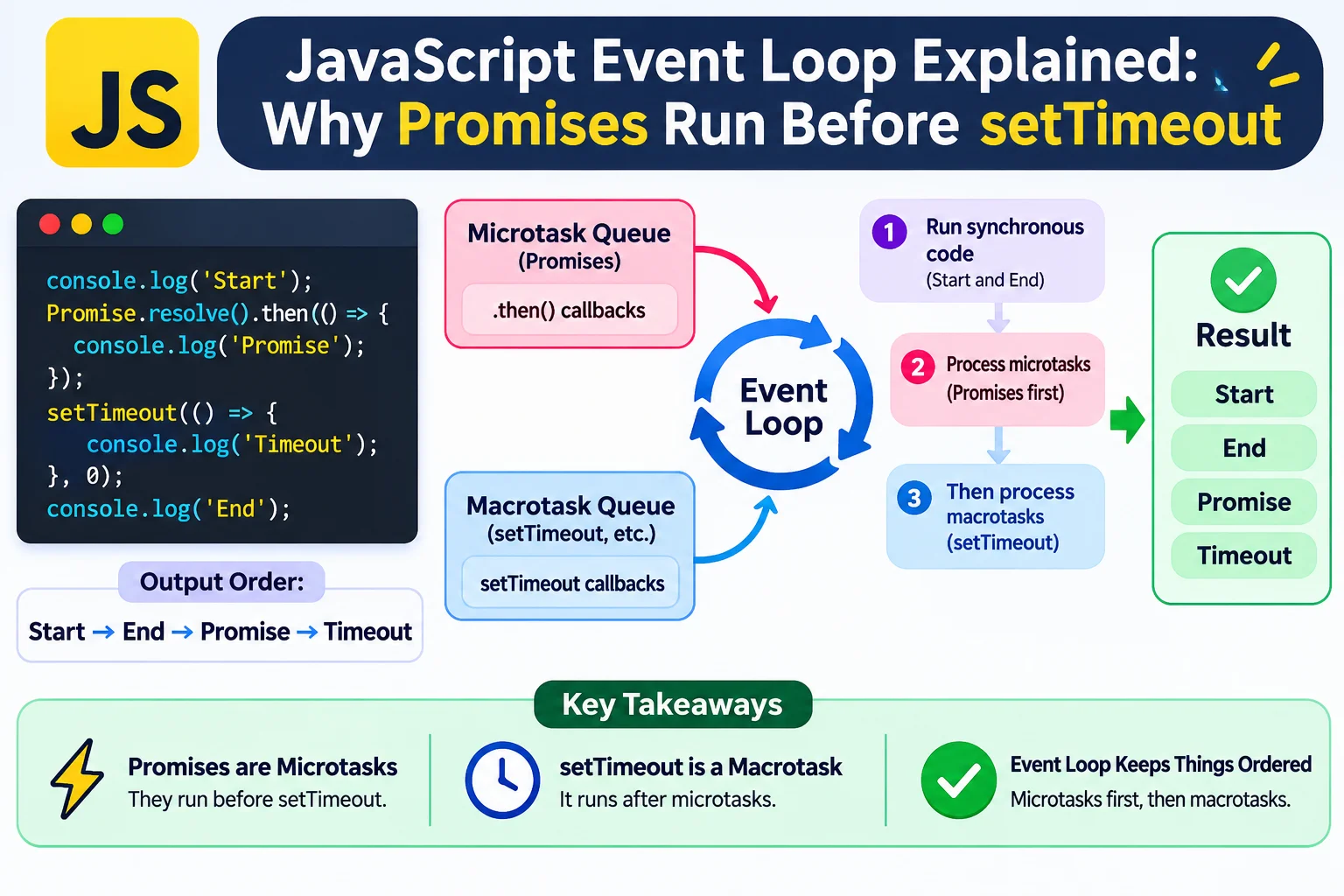
JavaScript Event Loop Explained: Why Promises Run Before setTimeout
You schedule a timer with a delay of zero milliseconds. Then you create an already-resolved promise.
Which callback runs first?
console.log("Start");

setTimeout(() => {
  console.log("Timer");
}, 0);

Promise.resolve().then(() => {
  console.log("Promise");
});

console.log("End");
The output is:
Start
End
Promise
Timer
The timer was scheduled first, but its callback runs last.
This is not random behavior. It follows the browser’s execution model: synchronous code runs first, microtasks are processed next, and timer callbacks run as later tasks.
Understanding this model makes asynchronous JavaScript easier to debug—and helps explain why an interface can freeze even when your code uses promises.
The Three Concepts You Need First
Before exploring the event loop, understand these three pieces:
| Concept | Purpose | Examples |
|---|---|---|
| Call stack | Tracks currently executing function calls | Function calls, synchronous statements |
| Tasks | Units of work scheduled for execution | Timer callbacks, event dispatch |
| Microtasks | Work processed at microtask checkpoints | Promise reactions, queueMicrotask() |
The browser coordinates these with other responsibilities, including rendering, input handling, and network activity.
The event loop is not simply one universal first-in, first-out queue. Browsers have multiple task sources and rules for selecting runnable work.
For everyday debugging, however, the most useful starting point is:
Current synchronous work completes before queued asynchronous callbacks can execute.
1. Synchronous Code Runs to Completion
Consider this example:
function greet() {
  console.log("Inside function");
}

console.log("Before");

greet();

console.log("After");
The output is:
Before
Inside function
After
Calling greet() adds a function call to the stack. When it finishes, execution returns to the surrounding code.
A queued timer or promise callback does not interrupt this sequence halfway through.
That is why a long-running synchronous function can delay other work:
console.log("Start");

setTimeout(() => {
  console.log("Timer finished");
}, 0);

const stopAt = performance.now() + 1000;

while (performance.now() < stopAt) {
  // Intentionally blocks the main thread.
}

console.log("Loop finished");
The timer callback cannot run while the loop occupies the main thread.
This example is intentionally inefficient. Avoid running blocking loops like this in production interfaces.
2. A Zero-Millisecond Timer Is Not Immediate
This code does not mean “run the callback now”:
setTimeout(callback, 0);It means the callback can become eligible to run after the timer’s delay has elapsed, subject to scheduling rules.
Before it executes:
- The current JavaScript work must finish.
- Pending microtasks may need to run.
- Other scheduling constraints may apply.
Browsers can also clamp timer delays or throttle timers in background contexts.
Treat timer delays as scheduling requests, not exact execution guarantees.
A Practical Consequence
Do not build a precise stopwatch by assuming every interval callback arrives exactly on time.
Instead, calculate elapsed time using a clock:
const startedAt = performance.now();

function updateElapsedTime() {
  const elapsedMs = performance.now() - startedAt;

  console.log(Math.floor(elapsedMs));
}

const intervalId = setInterval(
  updateElapsedTime,
  100
);

// Call when finished:
// clearInterval(intervalId);
The update frequency may vary, but the displayed duration is based on elapsed time rather than a count of callbacks.
3. Promise Callbacks Use Microtasks
Callbacks passed to .then(), .catch(), and .finally() run asynchronously through promise reactions.
Even an already-fulfilled promise does not execute its .then() callback inline:
const promise = Promise.resolve("Ready");

promise.then((value) => {
  console.log(value);
});

console.log("Still synchronous");
Output:
Still synchronous
Ready
The callback is queued as a microtask.
At a microtask checkpoint, the browser processes pending microtasks until the queue is empty, including microtasks added by other microtasks.
This is why promise callbacks can run before a previously scheduled timer.
4. Promise Executors Are Synchronous
A common source of confusion is the difference between a promise’s executor and its callbacks.
console.log("A");

const promise = new Promise((resolve) => {
  console.log("B");
  resolve();
});

promise.then(() => {
  console.log("C");
});

console.log("D");
Output:
A
B
D
C
The function passed to new Promise() runs immediately.
The .then() callback runs later as a microtask.
Wrapping expensive work in a promise does not automatically move it off the main thread.
This still blocks:
const promise = new Promise((resolve) => {
  const result = expensiveCalculation();
  resolve(result);
});
The calculation runs synchronously while constructing the promise.
5. How async and await Fit In
An async function begins executing synchronously.
When execution reaches await, the function suspends, and its continuation is scheduled asynchronously once the awaited value is ready.
async function demonstrate() {
  console.log("Inside: before await");

  await Promise.resolve();

  console.log("Inside: after await");
}

console.log("Outside: before call");

demonstrate();

console.log("Outside: after call");
Output:
Outside: before call
Inside: before await
Outside: after call
Inside: after await
The code before await runs during the function call.
The code after await resumes later.
This also happens when awaiting a non-promise value:
async function example() {
  console.log("First");

  await 42;

  console.log("Third");
}

example();

console.log("Second");
Output:
First
Second
Third
await changes execution order. It does not create a background thread.
6. Microtasks Can Schedule More Microtasks
Consider this example:
console.log("Start");

queueMicrotask(() => {
  console.log("Microtask A");

  queueMicrotask(() => {
    console.log("Microtask C");
  });
});

Promise.resolve().then(() => {
  console.log("Microtask B");
});

setTimeout(() => {
  console.log("Timer");
}, 0);

console.log("End");
Output:
Start
End
Microtask A
Microtask B
Microtask C
Timer
Here is the sequence:
- Synchronous code prints
StartandEnd. - Microtask A runs.
- A adds Microtask C behind the already-queued Microtask B.
- Microtask B runs.
- Microtask C runs.
- The timer callback runs as a later task.
The microtask queue is not processed just once per original entry. Newly added microtasks are also drained before the checkpoint finishes.
7. Too Many Microtasks Can Freeze an Interface
Because microtasks are drained until none remain, recursively scheduling them can prevent the browser from moving on.
Do not run this:
function repeatForever() {
  queueMicrotask(repeatForever);
}

repeatForever();
The queue never becomes empty.
As a result, the browser can be prevented from processing later tasks and rendering updates.
A similar problem can occur with a long promise chain that repeatedly schedules more work.
Asynchronous does not necessarily mean responsive.
An application must leave opportunities for the browser to handle other responsibilities.
8. Why await Promise.resolve() Does Not Reliably Yield to Rendering
Developers sometimes try this:
showLoadingIndicator();

await Promise.resolve();

performExpensiveWork();
The expectation is that the browser will display the loading indicator before starting the expensive work.
That is not guaranteed.
The continuation runs as a microtask, and the browser normally drains microtasks before moving to a rendering opportunity.
If you need to break substantial work into chunks, yielding through later tasks can help:
function yieldToTaskQueue() {
  return new Promise((resolve) => {
    setTimeout(resolve, 0);
  });
}

async function processItems(items) {
  for (let index = 0; index < items.length; index++) {
    processItem(items[index]);

    if ((index + 1) % 100 === 0) {
      await yieldToTaskQueue();
    }
  }
}
This gives the browser opportunities to perform other work between chunks. It does not guarantee a paint after every yield.
The chunk size should reflect the actual cost of processing, not an arbitrary rule that 100 items is always safe.
For substantial CPU-heavy work, a Web Worker may be a better solution.
9. Where requestAnimationFrame Belongs
requestAnimationFrame() schedules a callback for an upcoming rendering update.
Use it for visual work such as:
- Updating an animation.
- Moving an element.
- Updating a scroll indicator.
- Coordinating interface changes with rendering.
requestAnimationFrame(() => {
  indicator.style.transform = "translateX(100px)";
});
It is not a generic replacement for timers, and it does not make expensive JavaScript free.
A long calculation inside the callback can still delay the frame:
requestAnimationFrame(() => {
  expensiveCalculation();
});
Also, the callback runs before the associated paint. Scheduling work with requestAnimationFrame() does not mean the browser has already displayed previous DOM changes.
10. A Practical Async-Debugging Checklist
When execution order surprises you, ask:
- Which statements run synchronously?
- Is a promise executor doing work immediately?
- Which callbacks are microtasks?
- Which callbacks run as later tasks?
- Does
awaitsuspend execution at this point? - Are microtasks continually scheduling more microtasks?
- Is expensive work still running on the main thread?
- Am I assuming a timer runs at an exact time?
- Does the browser get an opportunity to render?
- Am I applying browser assumptions to a different runtime?
That last question matters. Node.js has additional scheduling mechanisms and event-loop phases, so browser examples should not be treated as a complete guide to Node.js execution order.
Frequently Asked Questions
Do promises run before timers?
In the common browser pattern where both are scheduled during the same synchronous execution, promise reactions run during the following microtask checkpoint before a later timer task. This is not a universal ordering rule for every independently occurring asynchronous operation.
Does async make a function run in the background?
No. An async function still executes JavaScript on its current thread. It returns a promise and can suspend at await, but synchronous calculations remain synchronous.
Does setTimeout(fn, 0) run after exactly zero milliseconds?
No. It schedules later work. Actual execution depends on timer rules and when the browser can run the callback.
Should I use queueMicrotask() everywhere?
No. It is useful when you specifically need microtask scheduling. Excessive microtask work can delay input handling and rendering.
Can a Web Worker access the DOM?
No. Workers can perform suitable background processing, then send results to the main thread, where DOM updates occur.
Final Thoughts
The JavaScript event loop becomes easier to understand when you separate three ideas:
- Synchronous code runs to completion.
- Microtasks are drained at checkpoints.
- Tasks and rendering proceed according to the browser’s scheduling model.
Promises, timers, and await do not eliminate execution costs. They change when work runs.
The most useful debugging question is therefore not simply:
“Is this code asynchronous?”
Ask:
“When will this work execute, and what can it prevent the browser from doing?”
Read Also: How to Handle Abort Controller in JavaScript
Try Next
Other utilities you might find helpful
Regex Tester
Test and debug regular expressions with live matches.
Regex Debugger
Understand regex step-by-step with explanations.
JSON Formatter
Format, validate, and minify JSON instantly.
Base64 Encoder/Decoder
Encode and decode Base64 strings and files.
SQL Explain Parser
Analyze SQL execution plans and optimize queries.
DOM Complexity Analyzer
Analyze HTML DOM structure, detect deep nesting, count nodes, and identify performance issues instantly.